> For the complete documentation index, see [llms.txt](https://docs.dinmo.io/llms.txt). Markdown versions of documentation pages are available by appending `.md` to page URLs; this page is available as [Markdown](https://docs.dinmo.io/identity-resolution/event-stitching.md).
# Event Stitching
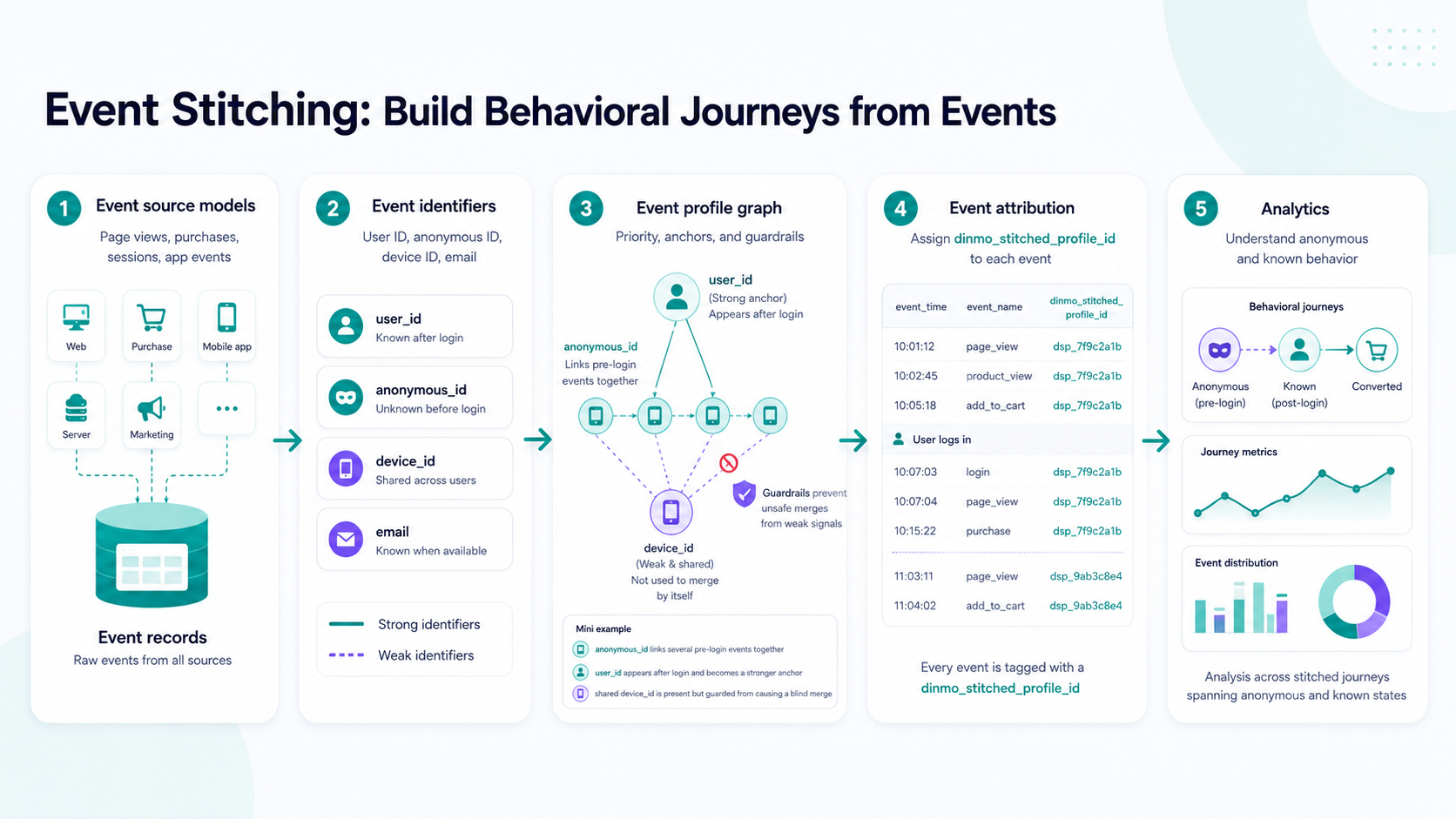
Event Stitching connects events that belong to the same behavioral journey.
Use it when your event models contain identifiers such as user ID, email, anonymous ID, cookie ID, device ID, session ID, click ID, or IP address, and you want to understand how activity changes from anonymous to known.
Event Stitching turns event records into behavioral journeys keyed by dinmo_stitched_profile_id.
## Example journey
An event journey often starts before a customer is known.
| Moment | Example identifiers on the event | What Event Stitching can do |
| ---------------------------------- | -------------------------------- | ------------------------------------------------------ |
| A visitor lands on the website | `anonymous_id`, `device_id` | Keep anonymous activity together. |
| The visitor browses several pages | `anonymous_id`, `session_id` | Continue the same journey when policy allows it. |
| The visitor signs in | `user_id`, `anonymous_id` | Connect pre-login and post-login activity. |
| The visitor purchases | `user_id`, `email`, `order_id` | Attach the conversion to the stitched journey. |
| The visitor opens a support ticket | `email`, `support_user_id` | Connect later interactions through strong identifiers. |
The output is event-level attribution: each processed event is either stitched to a `dinmo_stitched_profile_id` or excluded with a reason.
## When to use Event Stitching
Use Event Stitching to:
* connect anonymous and known events
* analyze journeys across web, app, conversion, support, or product events
* build event-level features for analytics or activation
* monitor identifier quality before trusting weak identifiers
* understand which events could not be stitched and why
Good input models include page views, sessions, purchases, conversions, app events, product usage events, support interactions, and campaign interactions.
## How setup works
Event Stitching setup has three main decisions.
| Step | What you configure |
| --------------------- | ------------------------------------------------------------------------------------------------------------------------------------- |
| Prepare event data | Select event-grain models with a stable primary key, timestamp field, partition field, and useful identifiers. |
| Map identifiers | Map physical columns from each model to logical identifiers such as User ID, Email, Anonymous ID, Device ID, Session ID, or Click ID. |
| Set identifier policy | Order identifiers from strongest to weakest, choose anchors, add blocked values, and set limits or stitching lifetimes. |
Start with high-confidence identifiers, then add weaker identifiers only when they improve coverage without over-connecting unrelated behavior.
## What DinMo writes
Event Stitching writes warehouse outputs that can be queried directly or used by downstream models.
| Output | Use it for |
| ------------------------------------------ | ------------------------------------------------------ |
| `identity_event_profile_attribution` | Join processed events to `dinmo_stitched_profile_id`. |
| `identity_event_profiles` | Inspect current and merged event profiles. |
| `identity_event_profile_identifier_values` | Understand which identifiers explain an event profile. |
| `identity_event_profile_run_metrics` | Monitor run quality without scanning event history. |
See [Event Stitching output tables](/identity-resolution/event-stitching/event-stitching-output-tables.md) for the full reference.
## What to review after a run
Before using stitched events downstream, check:
* processed event count and stitch rate
* excluded events and exclusion reasons
* identifier coverage by source model
* top conflicted or blocked identifier values
* event profiles with unusually many identifiers
* changes after updating identifier priority, limits, or blocked values
The most important exclusion reasons are:
| Reason | Meaning |
| ----------------------------- | --------------------------------------------------------------- |
| `no_matchable_identifier` | The event did not carry a usable identifier. |
| `conflicted_identifier_value` | A value was quarantined because it connected too many profiles. |
| `limit_conflict` | Matching would have violated a configured limit. |
## What to read next
| Goal | Read |
| --------------------------------------------- | ---------------------------------------------------------------------------------------------------------------- |
| Check whether your event models are ready | [Prepare event data for Event Stitching](/identity-resolution/event-stitching/event-stitching-prepare-data.md) |
| Create the project in DinMo | [Create an Event Stitching project](/identity-resolution/event-stitching/event-stitching-create-project.md) |
| Understand identifier priority and guardrails | [Identifier policy and guardrails](/identity-resolution/event-stitching/event-stitching-identifier-policy.md) |
| See examples of stitching decisions | [How Event Stitching works](/identity-resolution/event-stitching/event-stitching-how-it-works.md) |
| Review run quality | [Review and monitor Event Stitching](/identity-resolution/event-stitching/event-stitching-review-and-monitor.md) |
| Inspect the graph output model | [Event profile graph](/identity-resolution/event-stitching/event-profile-graph.md) |
---
# Agent Instructions
This documentation is published with GitBook. GitBook is the documentation platform designed so that both humans and AI agents can read, navigate, and reason over technical content effectively. Learn more at gitbook.com.
## Querying This Documentation
If you need additional information that is not directly available in this page, you can query the documentation by asking a question.
Perform an HTTP GET request on the following URL with the `ask` and `goal` query parameters:
```
GET https://docs.dinmo.io/identity-resolution/event-stitching.md?ask=&goal=
```
`ask` is the immediate question: it should be specific, self-contained, and written in natural language.
`goal` is what the user is ultimately trying to achieve, the reason they need the answer. Sharing it helps GitBook give you a better, more relevant answer. A goal is most helpful when it describes the outcome the user wants rather than restating the question. For example, with `ask=how do I create an API token`, a goal like `automate deployments from our CI pipeline` lets GitBook tailor the answer to that use case.
The response will contain a direct answer to the question and relevant excerpts and sources from the documentation.
Use this mechanism when the answer is not explicitly present in the current page, you need clarification or additional context, or you want to retrieve related documentation sections.