> For the complete documentation index, see [llms.txt](https://docs.dinmo.io/llms.txt). Markdown versions of documentation pages are available by appending `.md` to page URLs; this page is available as [Markdown](https://docs.dinmo.io/identity-resolution/event-stitching/event-stitching-identifier-policy.md).
# Identifier policy and guardrails
The Event Stitching identifier policy defines which event identifiers can connect events, in which order, and under which protections.
Use this page before adding weak identifiers such as cookies, anonymous IDs, device IDs, session IDs, click IDs, or IP addresses. These values improve coverage, but they can also over-connect unrelated people when they are shared, recycled, or corrupted.
For concrete examples of anonymous-to-known stitching, shared devices, quarantined values, and profile redirects, see [How Event Stitching works](/identity-resolution/event-stitching/event-stitching-how-it-works.md).
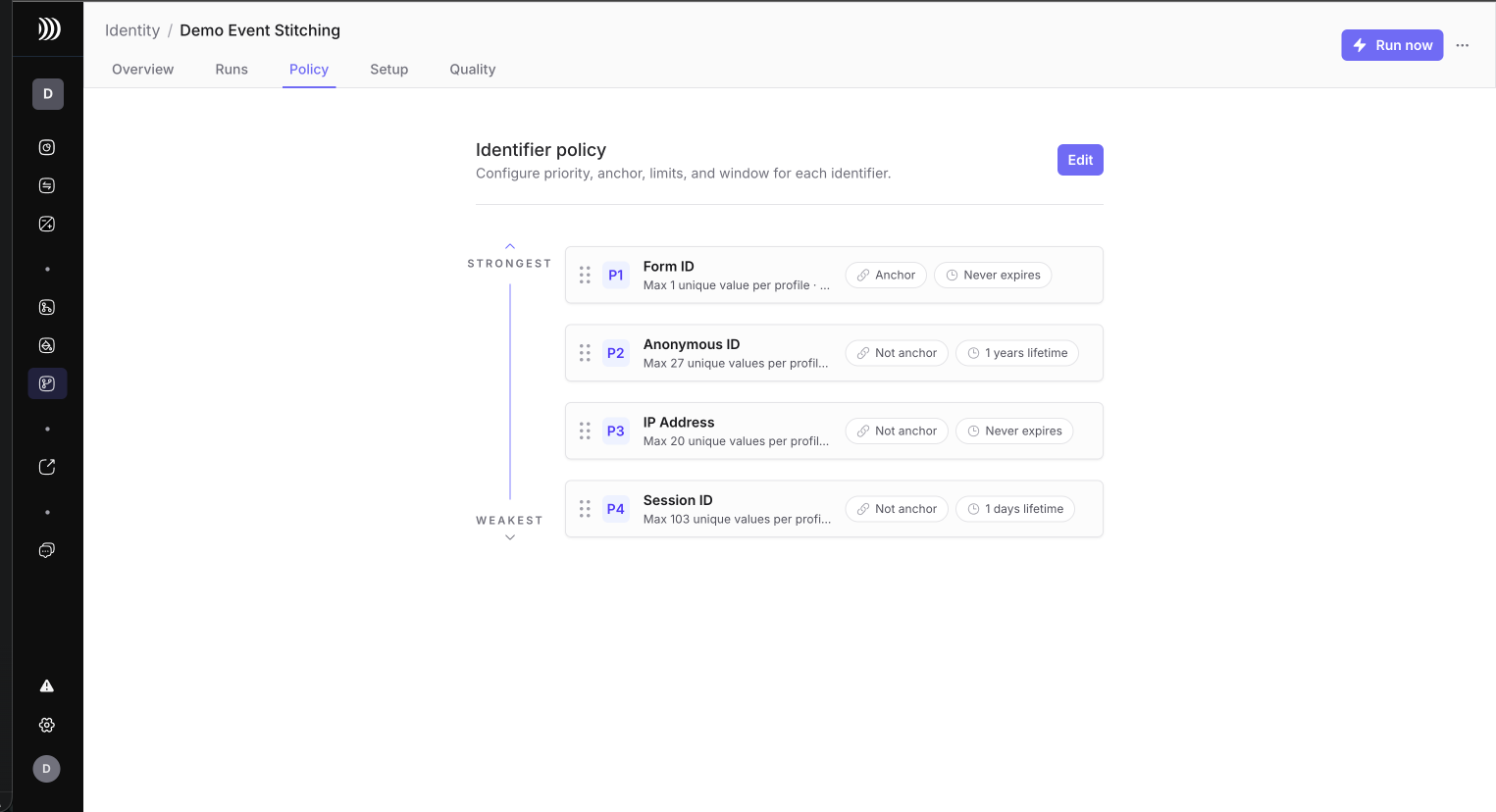
Review identifier priority, anchor settings, limits, and stitching lifetime from the Policy tab.
## Policy settings
| Setting | What it controls |
| ----------------------------- | -------------------------------------------------------------------------------------------------------------------------- |
| Priority | Order in which identifiers are evaluated. Lower number means stronger and runs first. |
| Anchor | Whether the identifier represents strong profile evidence. |
| Stitching lifetime | How long an observed identifier value can keep matching future events. |
| Max unique values per profile | Maximum number of active values of this identifier to keep on one event profile. Empty means no configured limit. |
| Max profiles per value | Maximum number of event profiles one identifier value can touch before it is quarantined. Empty means no configured limit. |
| Blocked values | Values ignored for matching because they are placeholders, test values, or known bad identifiers. |
| Standardization | Cleanup applied before matching, such as trim, lowercase, or numeric-only. |
## How the two limits differ
`Max profiles per value` and `Max unique values per profile` protect against different risks.
| Limit | Main question | What happens when it applies |
| ----------------------------- | ------------------------------------------------------------------ | ---------------------------------------------------------------------------------------- |
| Max profiles per value | Is this one value touching too many profiles? | DinMo quarantines the value so it cannot keep matching future events. |
| Max unique values per profile | Is this profile keeping too many active values for one identifier? | DinMo keeps the most recent active values and demotes older values from active matching. |
Use `Max profiles per value` for shared, corrupted, or reused values. Use `Max unique values per profile` to keep the active graph compact when values naturally rotate.
## Priority
Priority controls the order of matching stages.
Strong identifiers should run first. Weaker identifiers can then attach events only when they do not violate the graph created by stronger evidence.
Recommended starting order:
| Priority | Identifier examples | Why |
| -------- | ---------------------------------- | ----------------------------------------------------------------------- |
| 1 | User ID, customer ID, account ID | Authenticated, system-generated, high-confidence identifiers. |
| 2 | Email, email hash, phone | Strong when standardized and governed. |
| 3 | Anonymous ID, device ID, cookie ID | Useful for pre-login behavior, but can be shared or recycled. |
| 4 | Session ID | Useful for short activity windows only. |
| 5 | Click IDs | Useful for attribution windows; usually not a long-term profile anchor. |
| 6 | IP address | Weakest. Use only with strict windows or for audit. |
## Anchor
An anchor identifier is strong profile evidence.
Use anchors for identifiers that should define or protect an event profile:
* user ID
* customer ID
* account ID
* governed email or phone
Do not mark weak identifiers as anchors by default:
* anonymous ID
* cookie ID
* device ID
* session ID
* click ID
* IP address
Anchors protect against over-merge. If two strong profiles would be connected only by a weak value, DinMo can keep the profiles separate and demote the weak value instead of silently merging them.
## Stitching lifetime
Stitching lifetime defines how long a value remains active for matching after its first event-time observation.
The UI exposes two modes:
| UI label | Meaning |
| ------------------------ | -------------------------------------------------------------------------------------------------------------------------------------------------------------- |
| Never | The value remains active until it is blocked, demoted, or replaced by policy. Cards display this as "Never expires". |
| Expires after first seen | The value can match events for the configured count and unit after its first observation. Cards display this as an N-day, N-week, N-month, or N-year lifetime. |
Recommended starting values:
| Identifier type | Recommended lifetime |
| ---------------------------------- | --------------------------------------------------------- |
| User ID, customer ID, account ID | Never expires |
| Email, phone | Never expires, unless the source frequently recycles them |
| Anonymous ID, cookie ID, device ID | 30 to 90 days |
| Session ID | 1 day or less |
| Click IDs | Campaign attribution window, often 30 to 90 days |
| IP address | 1 day or less |
Avoid describing this as a continuously renewed window. The important idea is lifetime from first observation.
## Max unique values per profile
`Max unique values per profile` limits how many active values of the same identifier DinMo keeps on one event profile.
Leave the field empty when the identifier should not have a configured limit.
Use it to keep active profile complexity bounded over time. This is especially useful for weak identifiers that naturally rotate, such as cookies, anonymous IDs, device IDs, session IDs, click IDs, or IP addresses.
Examples:
| Identifier | Suggested starting limit | Why |
| ---------------------------------- | ------------------------- | ------------------------------------------------------------------------------------------ |
| User ID | 1 | One event profile should not contain two unrelated authenticated users by default. |
| Customer ID | 1 | Same as user ID. |
| Account ID | 1 to 3 | Use a higher value only if account switching is expected. |
| Email | 1 to 3 | Allow personal/work emails when relevant; keep strict for activation use cases. |
| Phone | 1 to 2 | Similar to email. |
| Anonymous ID, cookie ID, device ID | Leave unset or set higher | These can rotate; combine this limit with `Max profiles per value` and stitching lifetime. |
| Session ID | 1 | A session should normally not belong to several profiles. |
When a profile has more active values than the configured limit, DinMo keeps the most recent active values and demotes older ones. The demoted values remain visible for audit, but they no longer create new matches.
This limit does not mean the overflow value is globally unsafe. Use `Max profiles per value` to detect values that are shared, corrupted, or reused across too many profiles.
## Max profiles per value
`Max profiles per value` limits how many event profiles a single identifier value can touch.
Leave the field empty when the identifier should not have a configured limit.
This protects against super-cluster values such as:
* shared browser cookies
* public kiosk devices
* family or call-center devices
* placeholder identifiers
* corrupted tracking values reused across many visitors
When a weak value crosses the limit, DinMo quarantines it. The value remains visible in audit as `inactive_demoted`, but it no longer participates in future matching.
Recommended starting values:
| Identifier type | Suggested starting limit |
| ---------------------------------- | ---------------------------------------------- |
| User ID, customer ID | 1 |
| Email, phone | 1 to 5, depending on expected sharing |
| Anonymous ID, cookie ID, device ID | 3 to 10 |
| Session ID | 1 to 3 |
| Click IDs | 1 to 5 |
| IP address | Leave unset or use very short lifetime instead |
## Blocked values
Blocked values are ignored for matching.
In the Configure drawer, add a blocked value and press Enter.
Add values that represent missing, placeholder, test, or known polluted identifiers:
* `unknown`
* `undefined`
* `null`
* `none`
* `test`
* `test@test.com`
* `00000000-0000-0000-0000-000000000000`
* empty strings after standardization
Blocked values are still useful as audit evidence. They explain why an event was not stitched without letting bad identifiers connect profiles.
## Standardization
Standardization makes equivalent values comparable.
Recommended defaults:
| Identifier type | Standardization |
| --------------------------------------------- | ---------------------------------------------------------------- |
| Email | Trim, lowercase, optional provider-specific cleanup if governed. |
| Email hash | Trim, lowercase. |
| Phone | Numeric-only or E.164 upstream. |
| User ID, customer ID, account ID | Trim; case handling depends on source semantics. |
| Cookie, anonymous, device, session, click IDs | Trim; lowercase only if source values are case-insensitive. |
| IP address | Trim; validate upstream when possible. |
Do not over-standardize opaque IDs. If a source treats `ABC` and `abc` as different IDs, lowercasing would create false matches.
## Starting policy
For a first production-like run:
1. Start with user ID, customer ID, account ID, email, and phone.
2. Mark only high-confidence identifiers as anchors.
3. Add anonymous ID, cookie ID, or device ID with lower priority and finite lifetime.
4. Add session ID and click IDs only with short or explicit lifetimes.
5. Add blocked values before the first run.
6. Review excluded reasons and conflicted identifier values before loosening limits.
Then use [Review and monitor Event Stitching](/identity-resolution/event-stitching/event-stitching-review-and-monitor.md) to decide whether coverage is too low or guardrails are too strict.
---
# Agent Instructions
This documentation is published with GitBook. GitBook is the documentation platform designed so that both humans and AI agents can read, navigate, and reason over technical content effectively. Learn more at gitbook.com.
## Querying This Documentation
If you need additional information that is not directly available in this page, you can query the documentation by asking a question.
Perform an HTTP GET request on the following URL with the `ask` and `goal` query parameters:
```
GET https://docs.dinmo.io/identity-resolution/event-stitching/event-stitching-identifier-policy.md?ask=&goal=
```
`ask` is the immediate question: it should be specific, self-contained, and written in natural language.
`goal` is what the user is ultimately trying to achieve, the reason they need the answer. Sharing it helps GitBook give you a better, more relevant answer. A goal is most helpful when it describes the outcome the user wants rather than restating the question. For example, with `ask=how do I create an API token`, a goal like `automate deployments from our CI pipeline` lets GitBook tailor the answer to that use case.
The response will contain a direct answer to the question and relevant excerpts and sources from the documentation.
Use this mechanism when the answer is not explicitly present in the current page, you need clarification or additional context, or you want to retrieve related documentation sections.