> For the complete documentation index, see [llms.txt](https://docs.dinmo.io/llms.txt). Markdown versions of documentation pages are available by appending `.md` to page URLs; this page is available as [Markdown](https://docs.dinmo.io/identity-resolution/event-stitching/event-stitching-investigate-results.md).

# Investigate results

Use this page when you need to understand why events were stitched, why events were excluded, or whether the event profile graph is safe to use downstream.

Start in the UI, then use the warehouse output tables for detailed investigation.

## Investigation workflow

Use this order after a new project, a configuration change, or an unexpected metric movement:

1. Open **Overview** to check processed events, stitch rate, profiles, trends, model breakdown, and identifier breakdown.
2. Open **Runs** to confirm the latest run succeeded and processed the expected event volume.
3. Open **Quality** to inspect health checks, identifier quality, exclusion reasons, and audit entries.
4. Open **Policy** to review priority, anchors, limits, stitching lifetime, and blocked values.
5. Query the public output tables when you need event-level or profile-level proof.

## Overview tab

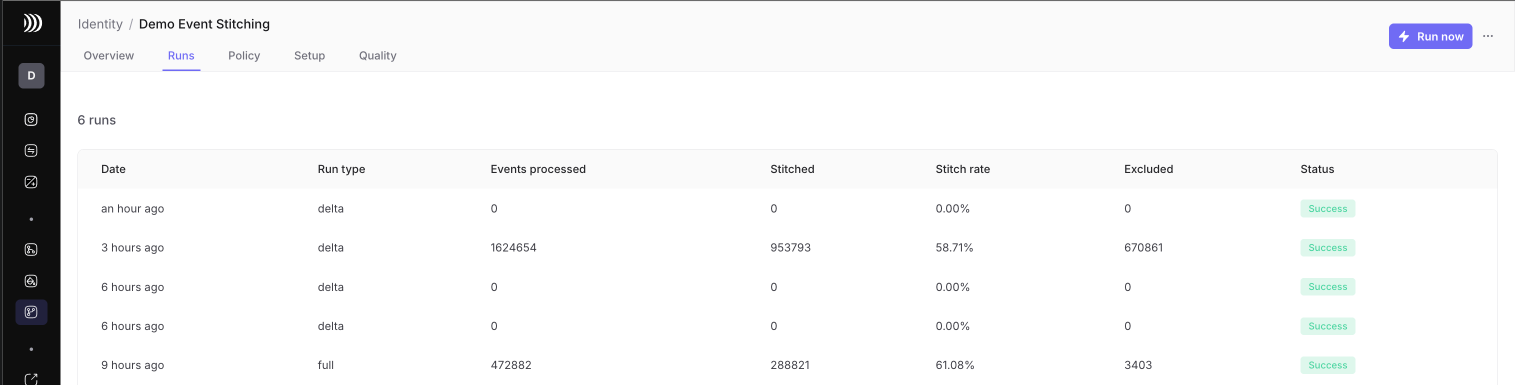
Use Overview to answer:

* How many events were processed in the latest run?
* What share of events were stitched?
* How many active profiles exist after the run?
* What share of profiles are known through anchor identifiers?
* Which model has the lowest stitch rate?
* Which identifier has low coverage or high conflicts?

<figure><img src="/files/kATJfKifNX8iSdUOwORT" alt="Event Stitching Overview tab"><figcaption><p>Start with Overview to compare latest-run KPIs, trends, model health, and identifier health.</p></figcaption></figure>

If the stitch rate is lower than expected, look first at the model breakdown. A single model with low stitch rate often points to missing identifiers, wrong field mapping, or a tracking change.

If active conflicts are not zero, inspect Quality before using outputs downstream.

## Runs tab

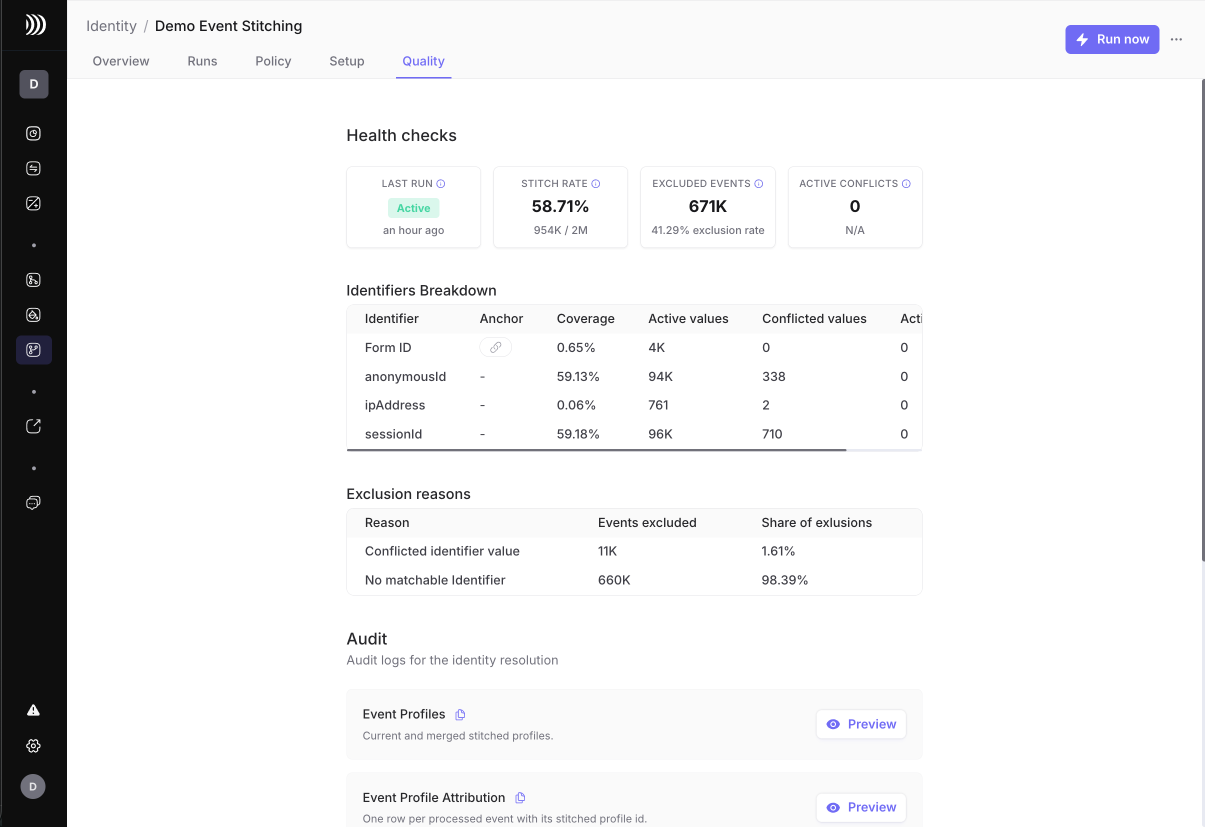
Use Runs to answer:

* Did the latest run succeed?
* Was the run manual or scheduled?
* How many events were processed?
* How many were stitched?
* How many were excluded?
* Did stitch rate change sharply from previous runs?

<figure><img src="/files/rHfAhhXdI9fDb2yrA81p" alt="Event Stitching Runs tab"><figcaption><p>Use Runs to compare processed volume, stitch rate, exclusions, and run status over time.</p></figcaption></figure>

When a run fails, check source field changes, output permissions, and whether the selected event partition column still exists.

## Quality tab

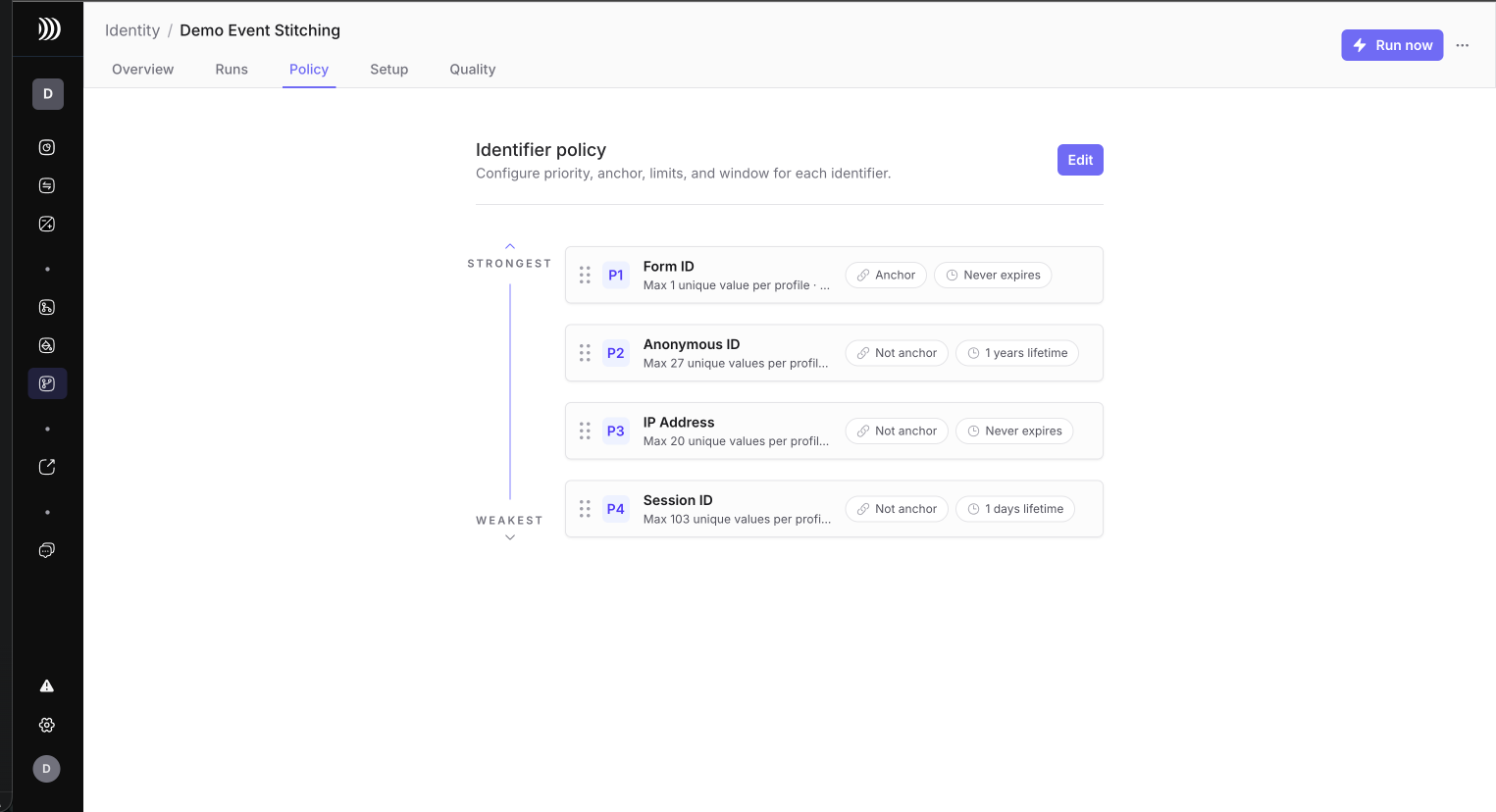
Use Quality to answer:

* Are health checks green?
* Are active conflicts zero?
* Which identifiers have low coverage?
* Which identifiers have many conflicted values?
* Why were events excluded?
* Which audit events explain recent graph changes?

<figure><img src="/files/elVxv9WrIpKBelDTDOBh" alt="Event Stitching Quality tab"><figcaption><p>Use Quality to understand exclusions, identifier conflicts, and audit signals.</p></figcaption></figure>

Interpret exclusion reasons this way:

| Reason                        | Meaning                                                                                                  | First action                                                          |
| ----------------------------- | -------------------------------------------------------------------------------------------------------- | --------------------------------------------------------------------- |
| `no_matchable_identifier`     | The event had no usable identifier after standardization, blocked values, and stitching lifetime checks. | Check mappings and identifier coverage.                               |
| `conflicted_identifier_value` | The event depended on a quarantined identifier value.                                                    | Inspect weak identifiers, max profiles per value, and blocked values. |
| `limit_conflict`              | Stitching the event would violate a configured identifier policy.                                        | Review identifier priority, anchor settings, and limits.              |

## Policy tab

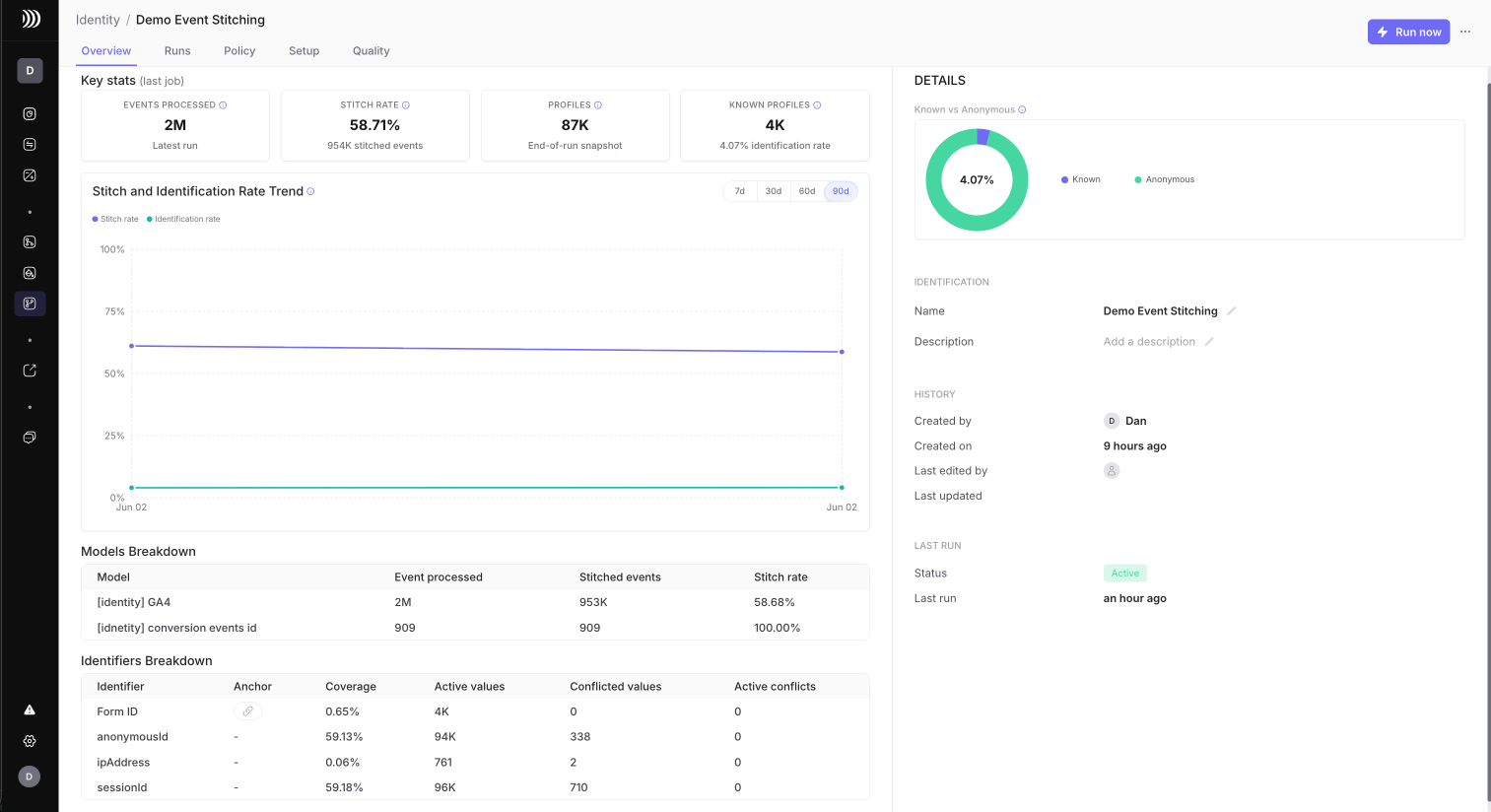
Use Policy when you need to adjust matching behavior.

<figure><img src="/files/MPjgj3WhTpPATHkP5v5t" alt="Event Stitching Policy tab"><figcaption><p>Use Policy to review or edit identifier priority, anchor settings, limits, stitching lifetime, and blocked values.</p></figcaption></figure>

Common changes:

| Symptom                                                           | Policy adjustment                                             |
| ----------------------------------------------------------------- | ------------------------------------------------------------- |
| Low stitch rate because identifiers expire too quickly            | Increase stitching lifetime for trusted identifiers.          |
| Weak identifiers connect too many profiles                        | Lower `Max profiles per value` or shorten stitching lifetime. |
| One profile accumulates too many active values for one identifier | Lower `Max unique values per profile`.                        |
| Placeholder values appear in audit or exclusions                  | Add them to blocked values.                                   |
| Weak identifiers dominate matching                                | Move them lower in priority and keep anchors at the top.      |

Do not loosen limits only to improve stitch rate. A high stitch rate is useful only when the resulting event profile graph remains explainable.

## Warehouse output tables

Event Stitching writes public output tables in the connected source, usually in `dinmo_identity`.

Physical table names may include the project ID. In the queries below, replace the logical table names with the physical names shown in DinMo.

| Table                                      | Use it for                                                                            |
| ------------------------------------------ | ------------------------------------------------------------------------------------- |
| `identity_event_profile_attribution`       | Event-level attribution and exclusion reasons.                                        |
| `identity_event_profiles`                  | Current and merged event profiles.                                                    |
| `identity_event_profile_identifier_values` | Identifier values attached to event profiles.                                         |
| `identity_event_profile_redirects`         | Resolve older profile IDs after merges.                                               |
| `identity_event_profile_audit_events`      | Explain graph changes and guardrail decisions.                                        |
| `identity_event_profile_run_metrics`       | Aggregated metrics by run, model, identifier, exclusion reason, and audit event type. |

See [Event Stitching output tables](/identity-resolution/event-stitching/event-stitching-output-tables.md) for the table reference.

## Read the audit trail

Use audit outputs when a metric tells you that something changed, but you need to know why.

| Starting point     | Question                                                        | Tables to inspect                                                                |
| ------------------ | --------------------------------------------------------------- | -------------------------------------------------------------------------------- |
| Event ID           | Why was this event stitched or excluded?                        | `identity_event_profile_attribution`, then `identity_event_profile_audit_events` |
| Identifier value   | Is this value active, expired, blocked, demoted, or conflicted? | `identity_event_profile_identifier_values`, then audit events                    |
| Old profile ID     | Where did this profile merge?                                   | `identity_event_profile_redirects`                                               |
| Current profile ID | Which identifiers and events explain this profile?              | Profiles, identifier values, attribution                                         |
| Run ID             | What changed during this run?                                   | Run metrics and audit events                                                     |

For downstream models, join on `resolved_dinmo_stitched_profile_id`. Use raw `dinmo_stitched_profile_id` only when you are intentionally inspecting historical IDs and redirects.

## Query latest run metrics

Use run metrics to reproduce UI-level numbers without scanning all event history:

```sql
select
  metric_scope,
  metric_scope_value,
  metric_name,
  metric_value_numeric
from `project.dinmo_identity.identity_event_profile_run_metrics`
where run_id = 'RUN_ID'
order by metric_scope, metric_scope_value, metric_name;
```

Find the latest run with processed events:

```sql
select
  run_id,
  max(recorded_at) as recorded_at,
  max(if(metric_name = 'new_processed_event_count', metric_value_numeric, null)) as processed_events,
  max(if(metric_name = 'new_stitched_event_count', metric_value_numeric, null)) as stitched_events,
  max(if(metric_name = 'new_excluded_event_count', metric_value_numeric, null)) as excluded_events,
  max(if(metric_name = 'stitch_rate', metric_value_numeric, null)) as stitch_rate
from `project.dinmo_identity.identity_event_profile_run_metrics`
where metric_scope = 'project'
group by run_id
having processed_events > 0
order by recorded_at desc
limit 10;
```

## Investigate exclusions

Count excluded events by reason:

```sql
select
  reason,
  count(*) as event_count
from `project.dinmo_identity.identity_event_profile_attribution`
where run_id = 'RUN_ID'
  and attribution_status = 'excluded'
group by reason
order by event_count desc;
```

Sample excluded events:

```sql
select
  source_model_id,
  event_key_value,
  event_timestamp,
  reason
from `project.dinmo_identity.identity_event_profile_attribution`
where run_id = 'RUN_ID'
  and attribution_status = 'excluded'
order by event_timestamp desc
limit 100;
```

If most excluded events are `no_matchable_identifier`, inspect the source model mappings and identifier coverage.

If most excluded events are `conflicted_identifier_value` or `limit_conflict`, inspect identifier policy and audit events.

## Investigate identifier quality

Find identifiers with active conflicts or many conflicted values:

```sql
select
  identifier_name,
  max(if(metric_name = 'coverage_rate', metric_value_numeric, null)) as coverage_rate,
  max(if(metric_name = 'all_active_identifier_value_count', metric_value_numeric, null)) as active_values,
  max(if(metric_name = 'all_conflicted_identifier_value_count', metric_value_numeric, null)) as conflicted_values,
  max(if(metric_name = 'all_active_conflicted_identifier_value_count', metric_value_numeric, null)) as active_conflicts
from `project.dinmo_identity.identity_event_profile_run_metrics`
where run_id = 'RUN_ID'
  and metric_scope = 'identifier'
group by identifier_name
order by active_conflicts desc, conflicted_values desc;
```

Inspect demoted identifier values. Demoted values remain useful audit evidence, but they no longer create new matches:

```sql
select
  identifier_name,
  identifier_value,
  resolved_dinmo_stitched_profile_id,
  first_seen_at,
  last_seen_at,
  status_reason
from `project.dinmo_identity.identity_event_profile_identifier_values`
where identifier_status = 'inactive_demoted'
order by last_seen_at desc
limit 100;
```

Inspect expired identifier values:

```sql
select
  identifier_name,
  identifier_value,
  resolved_dinmo_stitched_profile_id,
  active_until,
  last_seen_at
from `project.dinmo_identity.identity_event_profile_identifier_values`
where identifier_status = 'inactive_expired'
order by active_until desc
limit 100;
```

## Investigate one event profile

Start from an event profile ID:

```sql
select *
from `project.dinmo_identity.identity_event_profiles`
where dinmo_stitched_profile_id = 'DINMO_STITCHED_PROFILE_ID'
   or resolved_dinmo_stitched_profile_id = 'DINMO_STITCHED_PROFILE_ID';
```

List identifiers on the profile:

```sql
select
  identifier_name,
  identifier_value,
  identifier_status,
  status_reason,
  first_seen_at,
  last_seen_at,
  active_until
from `project.dinmo_identity.identity_event_profile_identifier_values`
where resolved_dinmo_stitched_profile_id = 'DINMO_STITCHED_PROFILE_ID'
order by priority, identifier_name, first_seen_at;
```

List events attached to the profile:

```sql
select
  source_model_id,
  event_key_value,
  event_timestamp,
  attribution_status,
  reason
from `project.dinmo_identity.identity_event_profile_attribution`
where resolved_dinmo_stitched_profile_id = 'DINMO_STITCHED_PROFILE_ID'
order by event_timestamp desc
limit 500;
```

## Investigate profile merges

Use redirects when older profile IDs may have merged into a surviving profile:

```sql
select
  dinmo_stitched_profile_id,
  resolved_dinmo_stitched_profile_id
from `project.dinmo_identity.identity_event_profile_redirects`
where dinmo_stitched_profile_id = 'OLD_DINMO_STITCHED_PROFILE_ID'
   or resolved_dinmo_stitched_profile_id = 'DINMO_STITCHED_PROFILE_ID';
```

Always use `resolved_dinmo_stitched_profile_id` for downstream joins.

## Investigate audit events

Audit events explain why the graph changed:

```sql
select *
from `project.dinmo_identity.identity_event_profile_audit_events`
where run_id = 'RUN_ID'
order by event_timestamp desc
limit 200;
```

Use audit events together with identifier values when investigating a conflict or demotion:

```sql
select *
from `project.dinmo_identity.identity_event_profile_audit_events`
where reason in ('conflicted_identifier_value', 'limit_conflict')
order by event_timestamp desc
limit 200;
```

## Rollout checklist

For a new Event Stitching project:

1. Prepare event data and check identifier coverage.
2. Create the project with conservative policy.
3. Run manually.
4. Review Overview and Runs.
5. Inspect Quality exclusion reasons and active conflicts.
6. Query sample profiles and excluded events in the warehouse.
7. Adjust policy if needed.
8. Enable the schedule only after the graph is explainable.
9. Use `resolved_dinmo_stitched_profile_id` in downstream models.


---

# Agent Instructions
This documentation is published with GitBook. GitBook is the documentation platform designed so that both humans and AI agents can read, navigate, and reason over technical content effectively. Learn more at gitbook.com.

## Querying This Documentation
If you need additional information that is not directly available in this page, you can query the documentation dynamically by asking a question.

Perform an HTTP GET request on the current page URL with the `ask` query parameter, and the optional `goal` query parameter:

```
GET https://docs.dinmo.io/identity-resolution/event-stitching/event-stitching-investigate-results.md?ask=<question>&goal=<endgoal>
```

`ask` is the immediate question: it should be specific, self-contained, and written in natural language.
`goal` is optional and describes the broader end goal you are ultimately trying to accomplish on behalf of the user. GitBook uses it to tailor the answer towards what is most useful for that goal.

The response will contain a direct answer to the question and relevant excerpts and sources from the documentation.

Use this mechanism when the answer is not explicitly present in the current page, you need clarification or additional context, or you want to retrieve related documentation sections.