> For the complete documentation index, see [llms.txt](https://docs.dinmo.io/llms.txt). Markdown versions of documentation pages are available by appending `.md` to page URLs; this page is available as [Markdown](https://docs.dinmo.io/identity-resolution/event-stitching/event-stitching-review-and-monitor.md).

# Review and monitor

After an Event Stitching run, review coverage, exclusion reasons, identifier quality, and graph stability before using stitched events downstream.

Event Stitching processes events into two public attribution outcomes:

| Outcome    | Meaning                                                                           |
| ---------- | --------------------------------------------------------------------------------- |
| `stitched` | The event was attached to a `dinmo_stitched_profile_id`.                          |
| `excluded` | The event was processed but not attached to a profile. The `reason` explains why. |

The main rate is:

```
stitch_rate = new_stitched_event_count / new_processed_event_count
```

## What to review first

Start with these questions:

* Did the latest run complete successfully?
* Does the processed event count match the expected source volume?
* Is the stitch rate plausible for each model?
* Are excluded events mostly coverage issues or quality guardrails?
* Which identifiers have low coverage?
* Which identifiers have active conflicts or many conflicted values?
* Which audit entries explain recent graph changes?

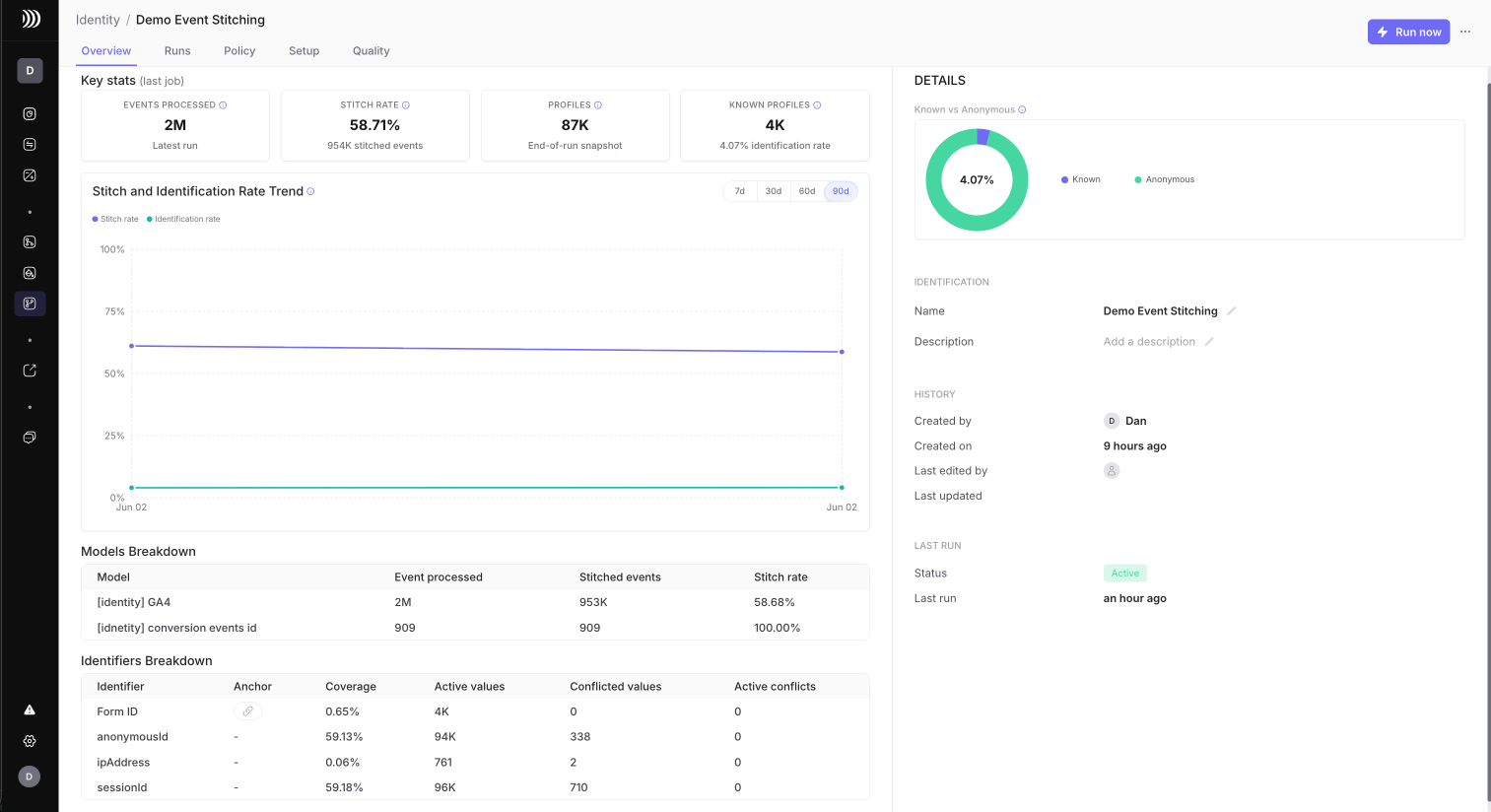
<figure><img src="/files/kATJfKifNX8iSdUOwORT" alt="Event Stitching Overview tab"><figcaption><p>Use Overview to review latest-run KPIs, trends, model breakdown, and identifier breakdown.</p></figcaption></figure>

## Overview

Use the Overview tab to validate the latest successful run and recent trends.

Review:

| Metric                               | What to check                                                             |
| ------------------------------------ | ------------------------------------------------------------------------- |
| Events processed                     | Events selected and processed in the latest run with events.              |
| Stitch rate                          | Share of processed events that were stitched.                             |
| Profiles                             | Active profiles with at least one active identifier after the run.        |
| Known profiles                       | Active profiles with at least one active anchor identifier after the run. |
| Stitch and identification rate trend | Run-level trend over recent successful runs with events.                  |
| Known vs Anonymous                   | Split between profiles with an active anchor and profiles without one.    |

Use these metrics as a consistency check. For every run:

```
processed events = stitched events + excluded events
```

If this does not hold, treat it as a data or reporting issue before trusting downstream analysis.

### Model breakdown

The model breakdown shows each selected event model.

| Column          | What to check                                                 |
| --------------- | ------------------------------------------------------------- |
| Model           | Event model name.                                             |
| Event processed | Events processed for that model in the latest run.            |
| Stitched events | Events stitched from that model.                              |
| Stitch rate     | Share of processed events from that model that were stitched. |

If one model has a much lower stitch rate than the others, inspect its mappings first. Many issues come from mapping the wrong physical field to a logical identifier, or from source events missing identity fields.

### Identifier breakdown

The identifier breakdown appears on both Overview and Quality.

| Column            | What to check                                                                               |
| ----------------- | ------------------------------------------------------------------------------------------- |
| Identifier        | Logical identifier name.                                                                    |
| Anchor            | Whether the identifier is configured as an anchor.                                          |
| Coverage          | Share of processed events carrying a usable value for this identifier.                      |
| Active values     | Current active values available for matching.                                               |
| Conflicted values | Values kept as evidence but removed from matching because they connected too many profiles. |
| Active conflicts  | Conflicted values still active after the run. This should normally be zero.                 |

High conflicted values on weak identifiers usually means the identifier is shared, corrupted, too long-lived, or too trusted.

## Quality

Use the Quality section to understand why events were excluded and where the graph may be unsafe.

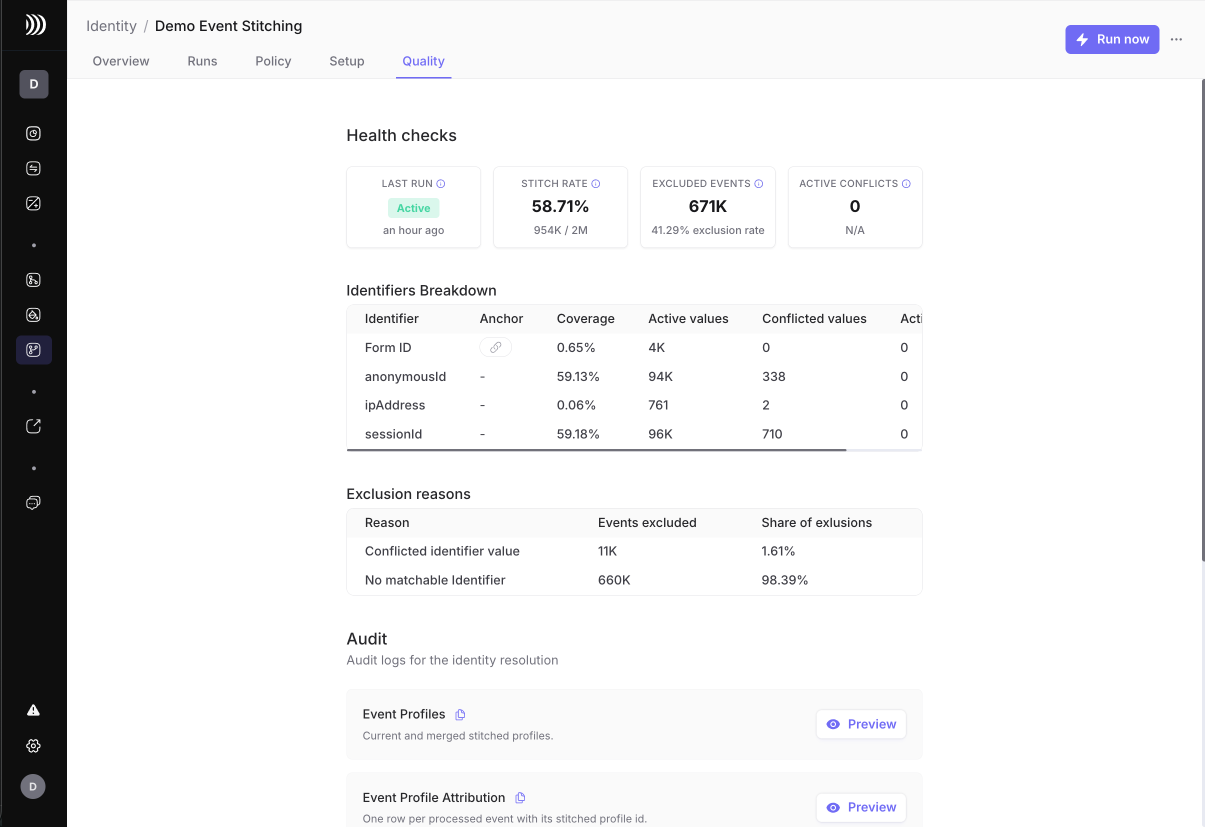
<figure><img src="/files/elVxv9WrIpKBelDTDOBh" alt="Event Stitching Quality tab"><figcaption><p>Use Quality to inspect health checks, identifier quality, exclusion reasons, and audit entries.</p></figcaption></figure>

### Health checks

Quality starts with four health checks:

| Check            | What it means                                                                    |
| ---------------- | -------------------------------------------------------------------------------- |
| Last run         | Latest project run status.                                                       |
| Stitch rate      | Latest run stitch rate and stitched event count.                                 |
| Excluded events  | Events processed but not stitched in the latest run.                             |
| Active conflicts | Conflicted identifier values still active after the run. Expected value is zero. |

### Exclusion reasons

| Reason                        | What it means                                                                                            | What to do                                                                                                    |
| ----------------------------- | -------------------------------------------------------------------------------------------------------- | ------------------------------------------------------------------------------------------------------------- |
| `no_matchable_identifier`     | The event had no usable identifier after standardization, blocked values, and stitching lifetime checks. | Improve source mappings, add missing identifier fields, or accept that this source has low identity coverage. |
| `conflicted_identifier_value` | The event depended on a value quarantined because it connected too many profiles.                        | Inspect the value, tighten lifetime, add blocked values, or lower trust in that identifier.                   |
| `limit_conflict`              | The event could not be stitched without violating a configured identifier policy.                        | Review identifier priority, anchor settings, and limits.                                                      |

Interpret reasons by family:

| Family    | Reasons                       | Typical owner                           |
| --------- | ----------------------------- | --------------------------------------- |
| Coverage  | `no_matchable_identifier`     | Data modeling, tracking, source mapping |
| Quality   | `conflicted_identifier_value` | Tracking quality, identifier policy     |
| Guardrail | `limit_conflict`              | Identity configuration                  |

High `no_matchable_identifier` usually means Event Stitching is working correctly but the source does not carry enough identifiers.

High `conflicted_identifier_value` usually means one or more weak identifiers are too broad, corrupted, shared, or long-lived.

### Audit

Use audit entries when you need to explain why the graph changed. Audit helps distinguish normal stitching from guardrail behavior, demotions, and excluded events.

Use [Identifier policy and guardrails](/identity-resolution/event-stitching/event-stitching-identifier-policy.md) to adjust priority, anchor, stitching lifetime, limits, and blocked values.

For SQL examples that reproduce these checks from the public output tables, see [Investigate Event Stitching results](/identity-resolution/event-stitching/event-stitching-investigate-results.md).

## Runs

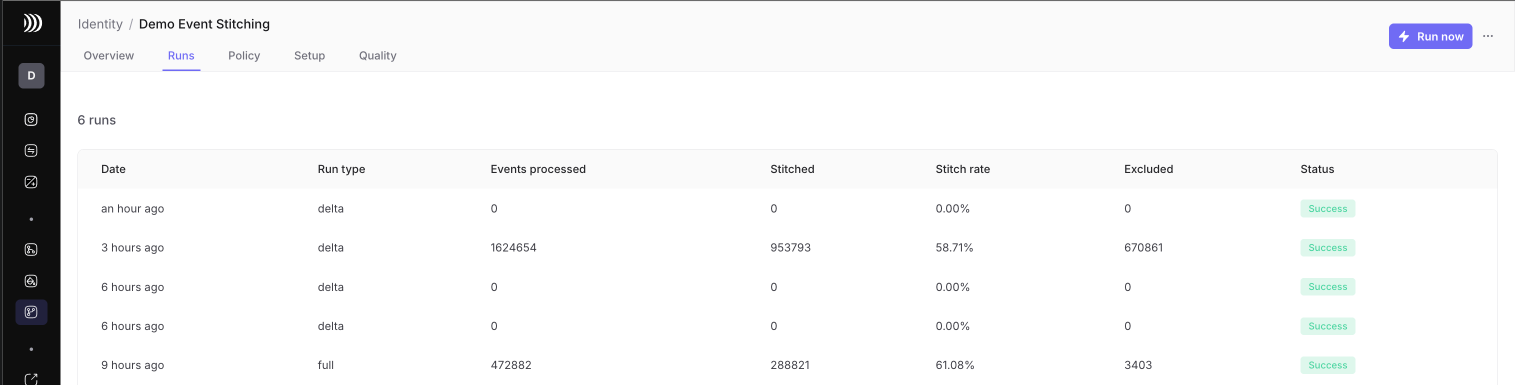
Use run history to confirm the project is processing the expected windows.

Review:

* run status
* run type
* processed window
* events processed
* stitched events
* stitch rate
* excluded events
* failed runs and permission issues

<figure><img src="/files/rHfAhhXdI9fDb2yrA81p" alt="Event Stitching Runs tab"><figcaption><p>Use Runs to confirm status, run type, processed events, stitched events, stitch rate, and excluded events.</p></figcaption></figure>

If a run fails, check:

* output dataset or schema permissions
* whether source tables still exist
* whether mapped fields still exist
* whether model primary key, timestamp, and partition columns are still valid
* whether the output dataset can create or replace Event Stitching tables

## Audit and warehouse validation

Use the UI for first-level monitoring, then query warehouse outputs when you need proof.

| Need                             | Output                                     |
| -------------------------------- | ------------------------------------------ |
| Join events to profiles          | `identity_event_profile_attribution`       |
| Inspect event profiles           | `identity_event_profiles`                  |
| Explain identifiers on a profile | `identity_event_profile_identifier_values` |
| Resolve merged profile IDs       | `identity_event_profile_redirects`         |
| Explain graph changes            | `identity_event_profile_audit_events`      |
| Power summary dashboards         | `identity_event_profile_run_metrics`       |

See [Event Stitching output tables](/identity-resolution/event-stitching/event-stitching-output-tables.md) for the full table reference.

## Tuning checklist

When coverage is too low:

* verify identifier mappings
* add missing event identifiers
* standardize email, phone, and IDs correctly
* check whether lifetimes are too short
* inspect `no_matchable_identifier` in Quality
* compare model-level stitch rates in Overview

When over-merge risk is too high:

* lower trust in weak identifiers by moving them to a later priority
* remove anchor from weak identifiers
* shorten stitching lifetime
* lower `maximum profiles per value`
* add known bad values to blocked values
* inspect conflicted value counts by identifier before loosening policy

When one source drifts:

* compare latest model metrics to previous runs
* inspect source schema changes
* validate the physical fields mapped to logical identifiers
* inspect event samples for missing or placeholder values

Do not loosen guardrails only to improve stitch rate. A high stitch rate is useful only when the resulting event profile graph remains explainable.


---

# Agent Instructions
This documentation is published with GitBook. GitBook is the documentation platform designed so that both humans and AI agents can read, navigate, and reason over technical content effectively. Learn more at gitbook.com.

## Querying This Documentation
If you need additional information that is not directly available in this page, you can query the documentation dynamically by asking a question.

Perform an HTTP GET request on the current page URL with the `ask` query parameter, and the optional `goal` query parameter:

```
GET https://docs.dinmo.io/identity-resolution/event-stitching/event-stitching-review-and-monitor.md?ask=<question>&goal=<endgoal>
```

`ask` is the immediate question: it should be specific, self-contained, and written in natural language.
`goal` is optional and describes the broader end goal you are ultimately trying to accomplish on behalf of the user. GitBook uses it to tailor the answer towards what is most useful for that goal.

The response will contain a direct answer to the question and relevant excerpts and sources from the documentation.

Use this mechanism when the answer is not explicitly present in the current page, you need clarification or additional context, or you want to retrieve related documentation sections.