> For the complete documentation index, see [llms.txt](https://docs.dinmo.io/llms.txt). Markdown versions of documentation pages are available by appending `.md` to page URLs; this page is available as [Markdown](https://docs.dinmo.io/identity-resolution/how-it-works.md).
# How Identity Resolution works
This page explains the mechanics behind Profile Resolution, matching, golden records, and Event Stitching. For the setup flow, see [Create your first Profile Resolution project](/identity-resolution/profile-resolution/get-started.md).
## Overview
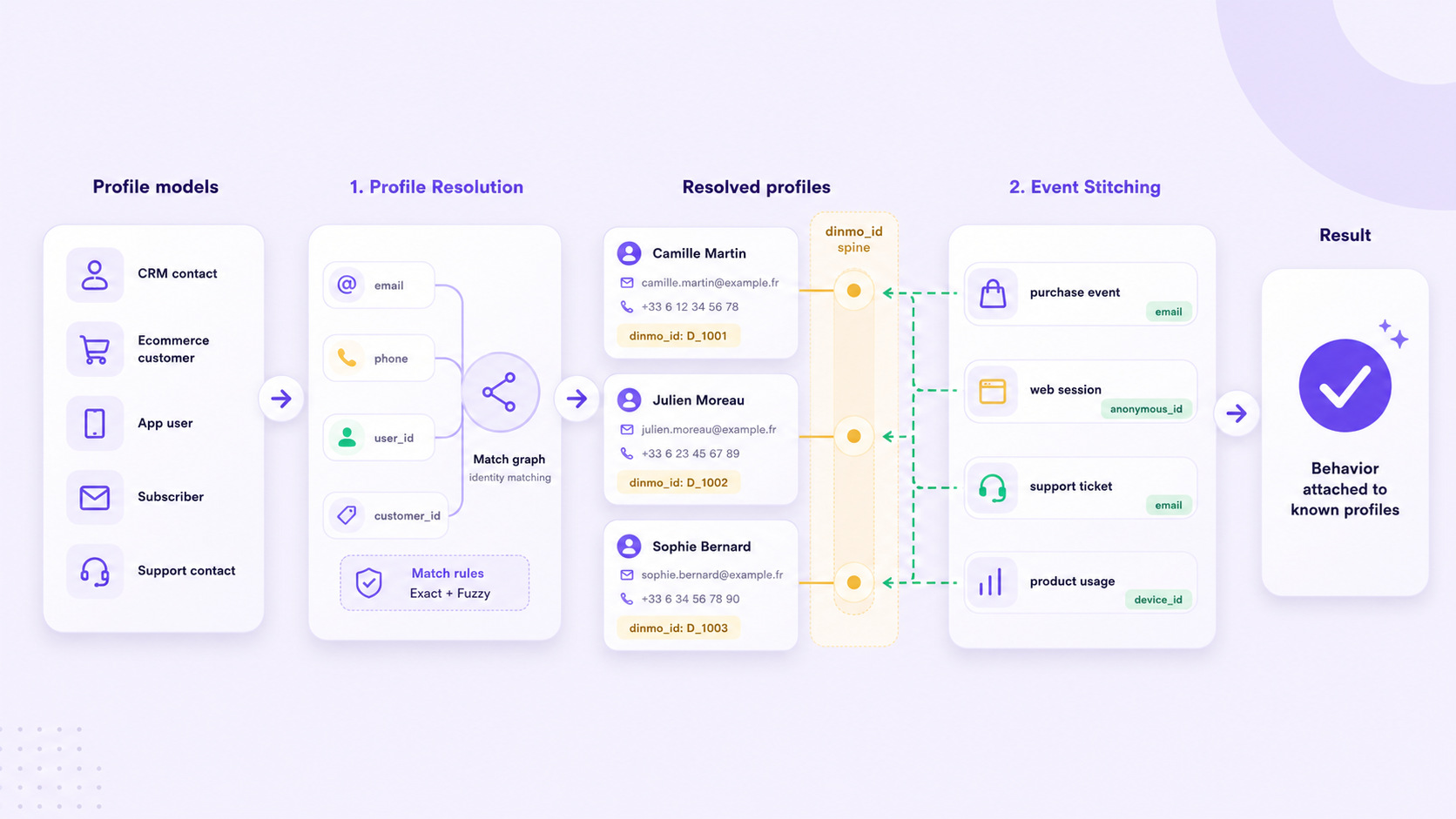
Identity Resolution runs in two stages:
1. [**Profile Resolution**](/identity-resolution/profile-resolution.md) builds the resolved profile spine.
2. [**Event Stitching**](/identity-resolution/event-stitching.md) builds a separate event profile graph from event records.
Profile records can create or merge resolved profiles. Event records can create or merge event profiles, but they do not create `dinmo_id` values or update the golden record.
Profile Resolution creates the profile spine; Event Stitching creates a separate event profile graph.
## Profile Resolution
Profile Resolution takes profile-like source models, such as CRM contacts, ecommerce customers, app users, subscribers, or support contacts.
DinMo standardizes configured identifiers, applies matching rules, and groups records that represent the same person or entity.
The result is a set of resolved profiles, each identified by a [`dinmo_id`](/identity-resolution/dinmo-id.md).
## Identifiers
Identifiers are the values used to connect records.
Common examples include:
* email
* phone
* user ID
* customer ID
* CRM contact ID
* anonymous ID
* device ID
For each identifier, you map the relevant source columns from each participating model. Identifier configuration, standardization, criteria, and conflict limits are covered in [Matching rules](/identity-resolution/profile-resolution/matching-rules.md).
DinMo standardizes identifiers before matching. At a minimum, values are trimmed and case-normalized. Additional identifier cleaning may be available depending on your configuration and identifier type.
## Matching rules
A matching rule defines when records should be linked. A rule is made of one or more criteria.
Rules can be simple:
* match on exact email
* match on exact user ID
Rules can also be composite:
* exact email and exact phone
* exact email and fuzzy last name
Criteria inside the same rule must all match. Multiple rules act as alternatives. See [Matching rules](/identity-resolution/profile-resolution/matching-rules.md) for the full AND/OR model and match type definitions.
## Fuzzy matching
[Anchored fuzzy matching](/identity-resolution/fuzzy-matching.md) helps with small variations in values such as names.
For example:
* the email criterion creates a high-confidence exact block
* the last-name criterion can compare similar values inside that block
This makes fuzzy matching safer than comparing every record with every other record.
## Guardrails and unresolved records
Identity Resolution includes guardrails to avoid unsafe merges.
Examples:
* blocking known bad identifier values
* limiting how many unique values of an identifier can exist inside one profile
If a record or cluster cannot safely be resolved, DinMo exposes it in unresolved outputs so you can inspect and improve the configuration. These outputs are available in the [Audit tab](/identity-resolution/profile-resolution/review-and-monitor.md#audit-tab) and in the warehouse [output tables](/identity-resolution/profile-resolution/output-tables.md).
## Golden record creation
After records are resolved, DinMo creates a [golden record](/identity-resolution/golden-record.md) table.
The golden record contains one row per `dinmo_id`. Each field can be selected with [survivorship rules](/identity-resolution/survivorship-rules.md), such as:
| Strategy | What it does |
| -------------------- | --------------------------------------------------------------- |
| Last non null | Uses the latest available non-empty value. |
| Model Priority Order | Prefers values from configured source models first. |
| Most frequent | Uses the value that appears most often in the resolved profile. |
This means the golden record can combine the best values from multiple source records.
## Event Stitching
Event Stitching connects event records into event profiles.
An event can be stitched when it carries an identifier that matches an existing event profile or creates a safe new one. For example, an event with an email, user ID, anonymous ID, or device ID can be connected to other events when the configured identifier policy allows it.
Event Stitching helps answer:
* which event profile does this event belong to?
* which identifier contributed to the link?
* which identifiers were blocked, expired, or demoted?
* how event coverage changes by source and run?
Event Stitching does not replace Profile Resolution. It creates `dinmo_stitched_profile_id`; Profile Resolution creates `dinmo_id` and the golden record.
## ID stability
`dinmo_id` is designed to remain stable across normal runs. In most cases, existing resolved profiles keep the same `dinmo_id` as new source records are added or updated.
A `dinmo_id` may change only in specific situations where the resolved identity graph itself changes, for example when two previously separate profiles are merged after new matching evidence appears, or when matching rules or source data are materially changed.
Downstream systems should treat `dinmo_id` as the current resolved profile key and use the output and audit tables to monitor merges, unresolved records, and other identity changes across runs.
---
# Agent Instructions
This documentation is published with GitBook. GitBook is the documentation platform designed so that both humans and AI agents can read, navigate, and reason over technical content effectively. Learn more at gitbook.com.
## Querying This Documentation
If you need additional information that is not directly available in this page, you can query the documentation dynamically by asking a question.
Perform an HTTP GET request on the current page URL with the `ask` query parameter, and the optional `goal` query parameter:
```
GET https://docs.dinmo.io/identity-resolution/how-it-works.md?ask=&goal=
```
`ask` is the immediate question: it should be specific, self-contained, and written in natural language.
`goal` is optional and describes the broader end goal you are ultimately trying to accomplish on behalf of the user. GitBook uses it to tailor the answer towards what is most useful for that goal.
The response will contain a direct answer to the question and relevant excerpts and sources from the documentation.
Use this mechanism when the answer is not explicitly present in the current page, you need clarification or additional context, or you want to retrieve related documentation sections.