> For the complete documentation index, see [llms.txt](https://docs.dinmo.io/llms.txt). Markdown versions of documentation pages are available by appending `.md` to page URLs; this page is available as [Markdown](https://docs.dinmo.io/identity-resolution/profile-resolution.md).
# Profile Resolution
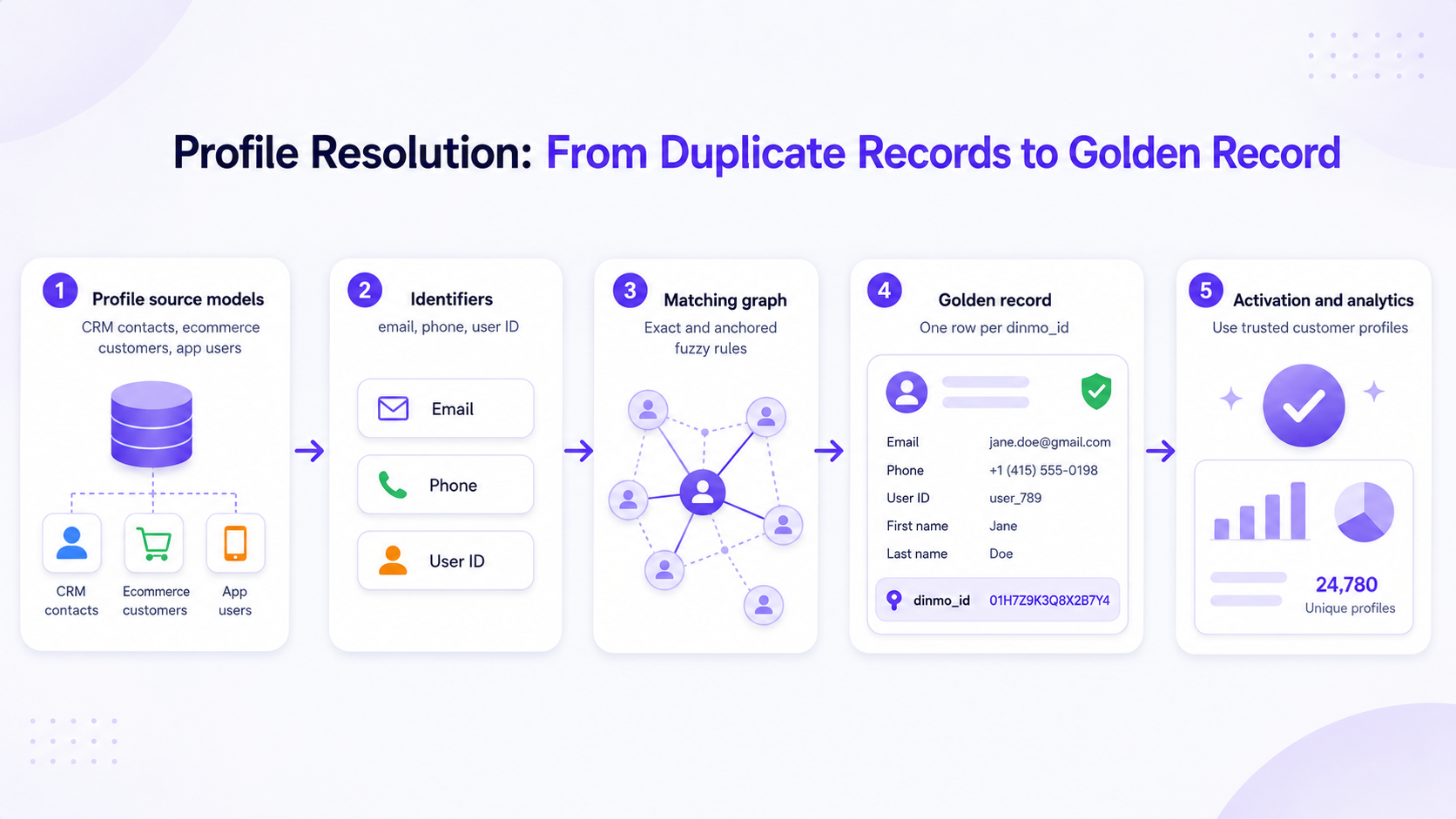
Profile Resolution is the first layer of Identity Resolution. It deduplicates profile-like records, assigns a stable resolved profile key, and creates a canonical profile spine that can be reused across DinMo.
The output of Profile Resolution is centered on [`dinmo_id`](/identity-resolution/dinmo-id.md), the resolved profile ID.
Profile Resolution turns duplicate profile records into a golden record keyed by dinmo_id.
## What Profile Resolution does
Profile Resolution:
* reads profile-like source models, such as CRM contacts, ecommerce customers, app users, subscribers, or support contacts
* standardizes configured [identifiers and matching rules](/identity-resolution/profile-resolution/matching-rules.md)
* groups records that refer to the same real-world customer or entity
* creates a [golden record](/identity-resolution/golden-record.md) with one row per `dinmo_id`
For a step-by-step setup guide, see [Create your first Profile Resolution project](/identity-resolution/profile-resolution/get-started.md).
## What Profile Resolution does not do
Profile Resolution does not resolve every warehouse table. Event, transaction, session, support ticket, and product usage tables should usually be modeled separately through [Event Stitching](/identity-resolution/event-stitching.md) or another attribution layer.
It also does not replace data modeling. Source models still need stable primary keys, useful identifiers, and fields that can support review and downstream use.
## Main outputs
| Output | Use it for |
| ------------------------------------------------------ | -------------------------------------------------------------- |
| `identity_golden` | Consume one row per resolved profile. |
| `identity_matched_ids` | Inspect which identifiers belong to each resolved profile. |
| `identity_unresolved_records` | Investigate records excluded by missing data or guardrails. |
| `identity_lookup`, `identity_match`, and `match_pairs` | Audit how records entered, resolved, and matched in the graph. |
See [Output tables](/identity-resolution/profile-resolution/output-tables.md) for the full table reference and [Review and monitor](/identity-resolution/profile-resolution/review-and-monitor.md) for validation guidance.
## When to use Profile Resolution
Use Profile Resolution when you need to:
* deduplicate customer or user records
* create a trusted profile spine for Customer Hub, Segments, Activations, analytics, or downstream models
* build a golden record from multiple source systems
* make identity decisions explainable through rules, audit tables, and monitoring
For the deduplication mechanics, see [How customer deduplication works](/identity-resolution/customer-deduplication.md).
---
# Agent Instructions
This documentation is published with GitBook. GitBook is the documentation platform designed so that both humans and AI agents can read, navigate, and reason over technical content effectively. Learn more at gitbook.com.
## Querying This Documentation
If you need additional information that is not directly available in this page, you can query the documentation by asking a question.
Perform an HTTP GET request on the following URL with the `ask` and `goal` query parameters:
```
GET https://docs.dinmo.io/identity-resolution/profile-resolution.md?ask=&goal=
```
`ask` is the immediate question: it should be specific, self-contained, and written in natural language.
`goal` is what the user is ultimately trying to achieve, the reason they need the answer. Sharing it helps GitBook give you a better, more relevant answer. A goal is most helpful when it describes the outcome the user wants rather than restating the question. For example, with `ask=how do I create an API token`, a goal like `automate deployments from our CI pipeline` lets GitBook tailor the answer to that use case.
The response will contain a direct answer to the question and relevant excerpts and sources from the documentation.
Use this mechanism when the answer is not explicitly present in the current page, you need clarification or additional context, or you want to retrieve related documentation sections.