> For the complete documentation index, see [llms.txt](https://docs.dinmo.io/llms.txt). Markdown versions of documentation pages are available by appending `.md` to page URLs; this page is available as [Markdown](https://docs.dinmo.io/identity-resolution/profile-resolution/matching-rules.md).
# Matching rules
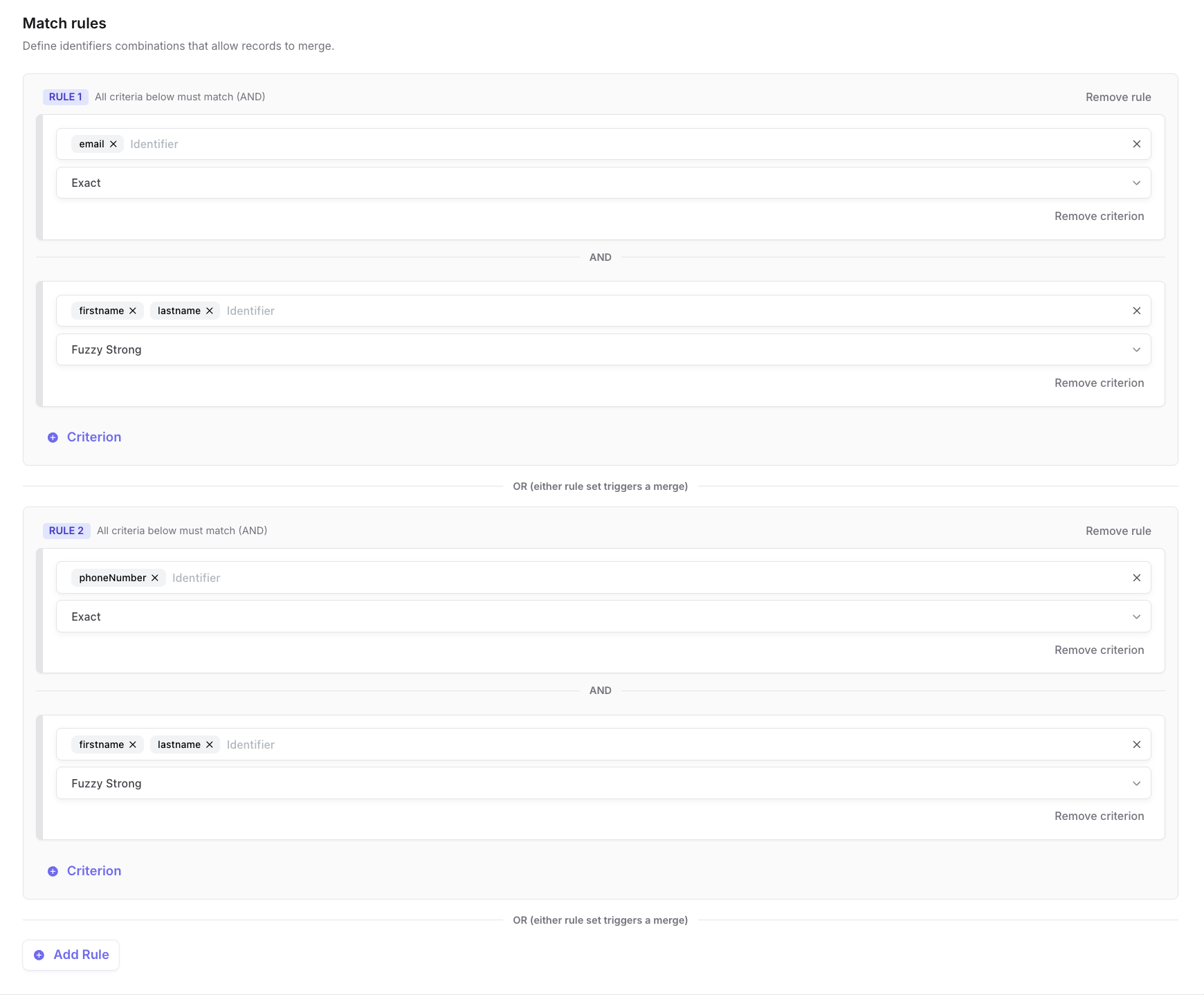
Matching rules define how records are allowed to merge inside an [identity graph](/identity-resolution/identity-graph.md). They are the main control surface for match quality: strict rules reduce unsafe merges, while broader rules increase coverage.
Use this page to understand identifiers, rules, criteria, match types, and conflict guardrails before configuring [Profile Resolution](/identity-resolution/profile-resolution.md).
## Core terms
| Term | Meaning |
| -------------- | -------------------------------------------------------------------------------------------------------------------------------------- |
| Identifier | A standardized value used to connect records, such as email, phone, user ID, customer ID, anonymous ID, or device ID. |
| Rule | A set of criteria that must be satisfied for records to merge. |
| Criterion | One condition inside a rule. A criterion selects one or more identifiers and a match type, such as exact email or fuzzy name matching. |
| Match type | The comparison method used by a criterion: exact, fuzzy medium, or fuzzy strong. |
| Conflict limit | A guardrail that limits how many distinct values of an identifier can exist inside one resolved profile. |
## How rule logic works
DinMo evaluates matching logic in two levels:
| Level | Logic | Example |
| ------------------------ | ----- | -------------------------------------------------------------------- |
| Criteria inside one rule | AND | `email` must match and `last_name` must be similar. |
| Multiple rules | OR | Merge if rule 1 matches, or if rule 2 matches, or if rule 3 matches. |
This lets you start with strict high-confidence rules and add broader alternatives only when they are justified by your data.
Rules combine criteria with AND inside each rule, while separate rules act as OR alternatives.
## Criteria
A criterion is the smallest matching condition in an identity graph.
Each criterion defines:
* which identifier or identifiers are compared
* which match type is used
* whether the criterion participates in a broader AND rule
For example, a rule can contain:
* criterion 1: exact match on `email`
* criterion 2: fuzzy strong match on `last_name`
Because both criteria are in the same rule, both conditions must match before records can merge.
## Match types
| Match type | What it does | Recommended use |
| ------------ | ----------------------------------------------- | ---------------------------------------------------------------------------- |
| Exact | Values must match after standardization. | Stable identifiers such as user ID, customer ID, email, or normalized phone. |
| Fuzzy Medium | Allows moderate similarity between values. | Secondary signals where small differences are expected. |
| Fuzzy Strong | Requires stronger similarity than fuzzy medium. | Names or labels that may contain minor typos but should stay conservative. |
If a rule contains a fuzzy criterion, it must also contain at least one exact criterion. This keeps [fuzzy matching](/identity-resolution/fuzzy-matching.md) anchored to a strong signal and reduces the risk of unrelated profiles being merged.
## Identifier standardization
Standardization is applied before matching so equivalent values can be compared consistently.
Available standardization methods include:
| Method | Typical use |
| ---------------- | ---------------------------------------------------------- |
| Trim | Remove extra whitespace around values. |
| Case insensitive | Compare values without casing differences. |
| Only numeric | Normalize phone-like values by keeping numeric characters. |
Choose the minimum standardization needed for each identifier. Over-normalizing can make different real-world values look identical.
## Conflict limits
Conflict limits cap how many distinct values of a given identifier are allowed inside one resolved profile. If a candidate merge would push a cluster past that cap, DinMo excludes the conflicting records from the [golden record](/identity-resolution/golden-record.md) instead of merging them.
You set a limit per identifier (the `max_unique_values` setting). The limit applies to the resolved cluster, not to a single record.
### Concrete example
Suppose `user_id` is configured with `max_unique_values = 1` and `email` with `max_unique_values = 2`. Three input records share the same phone number and match through a rule on `phone`:
| record | `user_id` | `email` | `phone` |
| ------ | --------- | --------------------- | ----------- |
| R1 | `U1` | `alice@example.com` | `+33611...` |
| R2 | `U1` | `alice.b@example.com` | `+33611...` |
| R3 | `U2` | `bob@example.com` | `+33611...` |
If the rule clustered all three together, the result would carry **2 distinct `user_id`** (`U1`, `U2`) and **3 distinct `email`** — both above the configured limits.
DinMo blocks the merge and exposes the three records in `identity_unresolved_records` with:
* `unresolved_reason = 'identifier_conflict'`
* `conflict_reasons = 'user_id has too many unique values (2 > limit of 1); email has too many unique values (3 > limit of 2)'`
The records are not silently dropped — they are kept in the unresolved table so you can investigate the shared `phone` value (likely a shared device, a placeholder number, or a data quality issue) and decide whether to add it to blocked values, tighten the rule, or fix the source data.
### Recommended values
Start strict on strong identifiers and loosen weaker identifiers only when your data justifies it.
| Identifier type | Recommended `max_unique_values` | Rationale |
| --------------------------------------------- | ------------------------------- | -------------------------------------------------------------------------------------------------------------------------------------------------------- |
| `user_id`, `customer_id` (system primary key) | `1` | One person should map to one application-level ID. More than one usually signals data corruption or a bad merge. |
| `email` | `1` to `3` | Most customers have one or two emails (personal + work). Above 3 distinct emails on one profile is usually a sign of a shared inbox or a polluted match. |
| `phone` | `1` to `2` | Similar to email; allow `2` if customers commonly have a mobile + landline. |
| `anonymous_id`, `device_id` | `5` to `10` (or leave unset) | Same person can have many devices over time. Looser limits avoid splitting legitimate profiles. |
Leave `max_unique_values` unset on an identifier to disable conflict checking for that column. Conflict detection only runs on identifiers that have a numeric limit configured.
When a candidate merge violates a conflict limit, the affected records appear in `identity_unresolved_records` with `unresolved_reason = 'identifier_conflict'` and a human-readable `conflict_reasons` string. Review them in [Review and monitor](/identity-resolution/profile-resolution/review-and-monitor.md) and in the warehouse [output tables](/identity-resolution/profile-resolution/output-tables.md#identity_unresolved_records).
## Recommended starting rules
Start with rules that are easy to explain and validate.
| Rule | Why it is safe |
| --------------------------------------------------- | ------------------------------------------------------------------------ |
| Exact `user_id` | Usually controlled by your application or business system. |
| Exact `customer_id` or CRM ID | Usually stable and system-generated. |
| Exact standardized `email` | Commonly available and easy to audit. |
| Exact standardized `phone` | Useful when phone formatting is normalized. |
| Exact strong identifier + fuzzy secondary criterion | Useful for controlled cleanup, but only when anchored by exact evidence. |
Avoid starting with broad fuzzy-only logic, shared household identifiers, placeholder emails, or low-quality IDs that are reused by multiple people.
## Review rules after each run
After a run, inspect:
* rule applicability
* valid match rate
* conflict rate
* unresolved records
* suspiciously large resolved profiles
* sample profiles for each important rule
Use [Review and monitor](/identity-resolution/profile-resolution/review-and-monitor.md) to inspect the Overview, Runs, Rules, and Audit tabs.
---
# Agent Instructions
This documentation is published with GitBook. GitBook is the documentation platform designed so that both humans and AI agents can read, navigate, and reason over technical content effectively. Learn more at gitbook.com.
## Querying This Documentation
If you need additional information that is not directly available in this page, you can query the documentation by asking a question.
Perform an HTTP GET request on the following URL with the `ask` and `goal` query parameters:
```
GET https://docs.dinmo.io/identity-resolution/profile-resolution/matching-rules.md?ask=&goal=
```
`ask` is the immediate question: it should be specific, self-contained, and written in natural language.
`goal` is what the user is ultimately trying to achieve, the reason they need the answer. Sharing it helps GitBook give you a better, more relevant answer. A goal is most helpful when it describes the outcome the user wants rather than restating the question. For example, with `ask=how do I create an API token`, a goal like `automate deployments from our CI pipeline` lets GitBook tailor the answer to that use case.
The response will contain a direct answer to the question and relevant excerpts and sources from the documentation.
Use this mechanism when the answer is not explicitly present in the current page, you need clarification or additional context, or you want to retrieve related documentation sections.