Review and monitor

After an identity graph runs, use the Identity Resolution tabs to validate quality, understand changes, and decide when the output is ready for downstream use.

Review is especially important after the first run, after changing matching rules, after adding source models, and before activating resolved profiles in segments or destinations.

What to review first

Start with these questions:

  • Did the latest run complete successfully?

  • Does the golden record count look plausible?

  • Are match, unique, missing, and conflict rates aligned with expectations?

  • Which models and rules contribute most to resolved profiles?

  • Which identifiers are incomplete or conflict-prone?

  • Are unresolved records explainable?

If the identity graph is new, validate a few representative clusters before using the outputs in production.

Validate Profile Resolution

Before using the profile spine downstream, validate:

  • total source records

  • resolved profile count

  • resolution rate

  • unresolved records

  • conflict rate

  • rule contribution

  • identifier completeness

  • sample matched profiles

Use the UI checks below for a first review, then query identity_golden, identity_matched_ids, identity_unresolved_records, identity_lookup, and match_pairs when you need deeper validation. See Output tables for the full table reference.

Overview tab

The Overview tab gives a high-level view of the latest run and recent trends.

Review:

Area
What to check

Key stats

Total source records, golden records, unique profiles, and valid matched records.

Resolution rate

Share of source records emitted in final outputs, split by unique, matched, conflict, and missing records.

Resolution and consolidation trend

Whether profile coverage and consolidation are stable across runs.

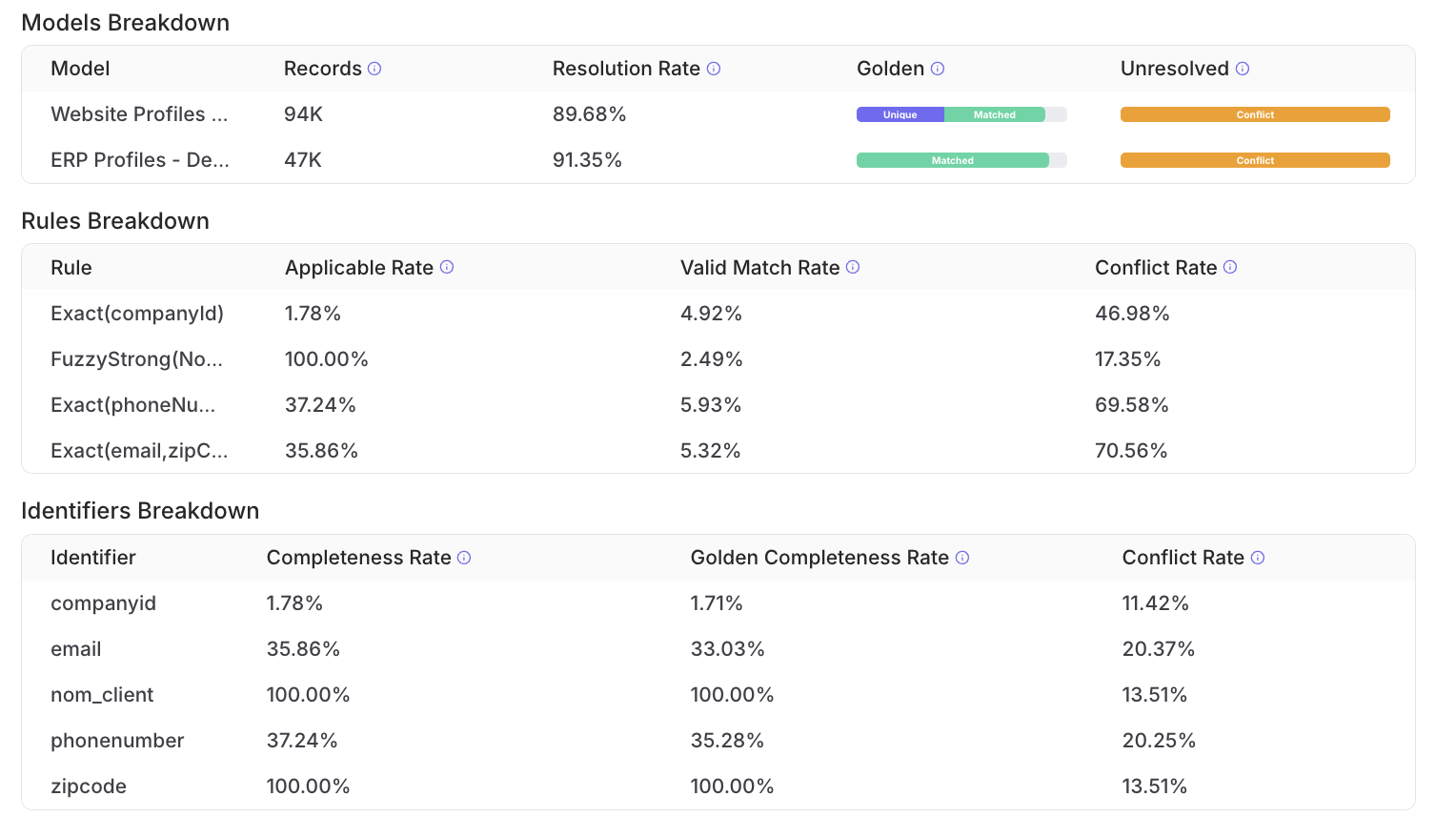
Models Breakdown

Record count, resolution rate, golden breakdown, and unresolved breakdown by model.

Rules Breakdown

Applicable rate, valid match rate, and conflict rate by rule.

Identifiers Breakdown

Completeness, golden completeness, and conflict rate by identifier.

Use this tab to identify where to investigate next. For example, a high conflict rate on one rule usually means you should review the matching logic and inspect the related audit tables.

Identity Resolution overview tab showing model, rule, and identifier breakdown statistics
The Overview tab highlights resolution quality by model, rule, and identifier.
Runs tab

The Runs tab shows execution history.

Review:

  • run date

  • run type, such as full or delta

  • total records

  • matched records

  • unique records

  • unresolved records

  • status

Use full runs after major configuration or source changes. Use delta runs to keep the identity graph fresh when only new or updated records need to be processed.

If a run fails, check whether the source schema changed, required fields are still present, output permissions are intact, and the configured schedule is still valid.

Rules tab

The Rules tab contains the current matching logic.

Use it to confirm:

  • each rule is still intentional

  • fuzzy criteria are anchored by exact criteria

  • criteria inside a rule use the expected AND logic

  • rules are not broader than the data quality can support

Changes to matching rules can affect merges, unresolved records, and downstream outputs. After changing rules, rerun the identity graph and review the Overview and Audit tabs again.

Golden Fields tab

The Golden Fields tab controls the canonical profile emitted in the golden record table.

Review:

  • which identifiers are included in the golden record

  • which model fields are exposed downstream

  • which survivorship strategy is used for each field

  • whether model priority still matches business trust

If the golden record is used by Customer Hub, Segments, Activations, BI, or downstream models, validate high-impact fields such as email, phone, customer ID, consent fields, and account identifiers before relying on them.

Setup tab

The Setup tab shows the structural configuration of the identity graph.

Review:

  • selected source

  • selected models

  • model field mappings

  • schedule

Use this tab when you need to confirm whether a model or field is participating in Profile Resolution.

Audit tab

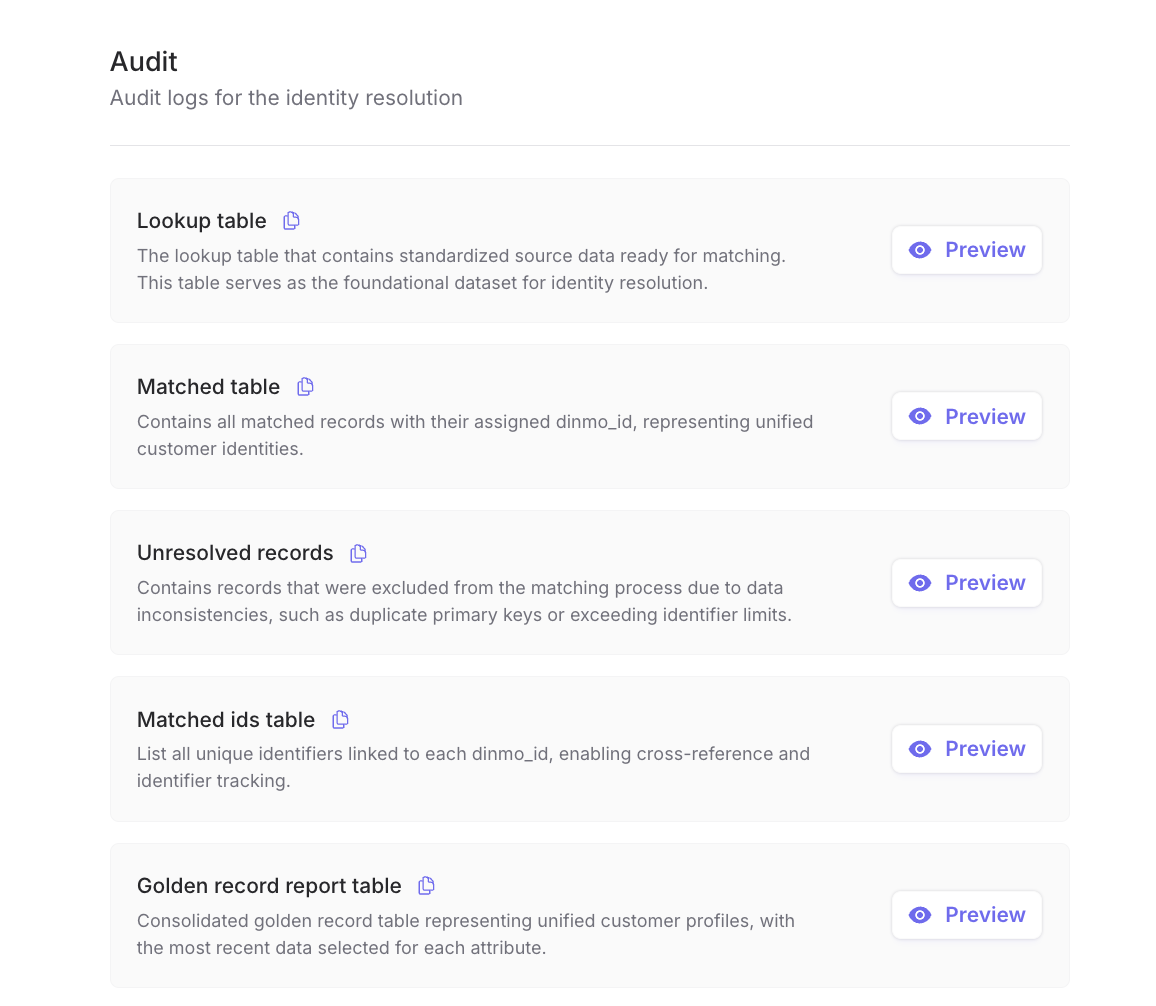
The Audit tab exposes the underlying audit tables and rule-level charts.

Review:

Audit item
What it helps explain

Lookup table

Which standardized source identifiers entered matching.

Matched table

Which records received a dinmo_id.

Unresolved records

Which records were excluded and why.

Matched ids table

Which identifier values are linked to each resolved profile.

Golden record table

The generated one-row-per-profile output.

Rule applicability

Which rules could be evaluated on the input data.

Rule matches

Which rules produced matched profiles.

UI labels may differ slightly from warehouse table names. Use this mapping when moving from the Audit tab to SQL:

Audit UI label
Warehouse output

Lookup table

identity_lookup

Matched table

identity_matched_ids for assigned identifiers, and match_pairs for pair-level match explanations

Unresolved records

identity_unresolved_records

Matched ids table

identity_matched_ids

Golden record table

identity_golden

Golden record report table

identity_golden_report

Use the table preview for quick inspection, then query the warehouse outputs for deeper analysis.

Identity Resolution audit tab showing lookup, matched, unresolved, matched ids, and golden record report tables
The Audit tab exposes the generated tables used to inspect matching and profile outputs.
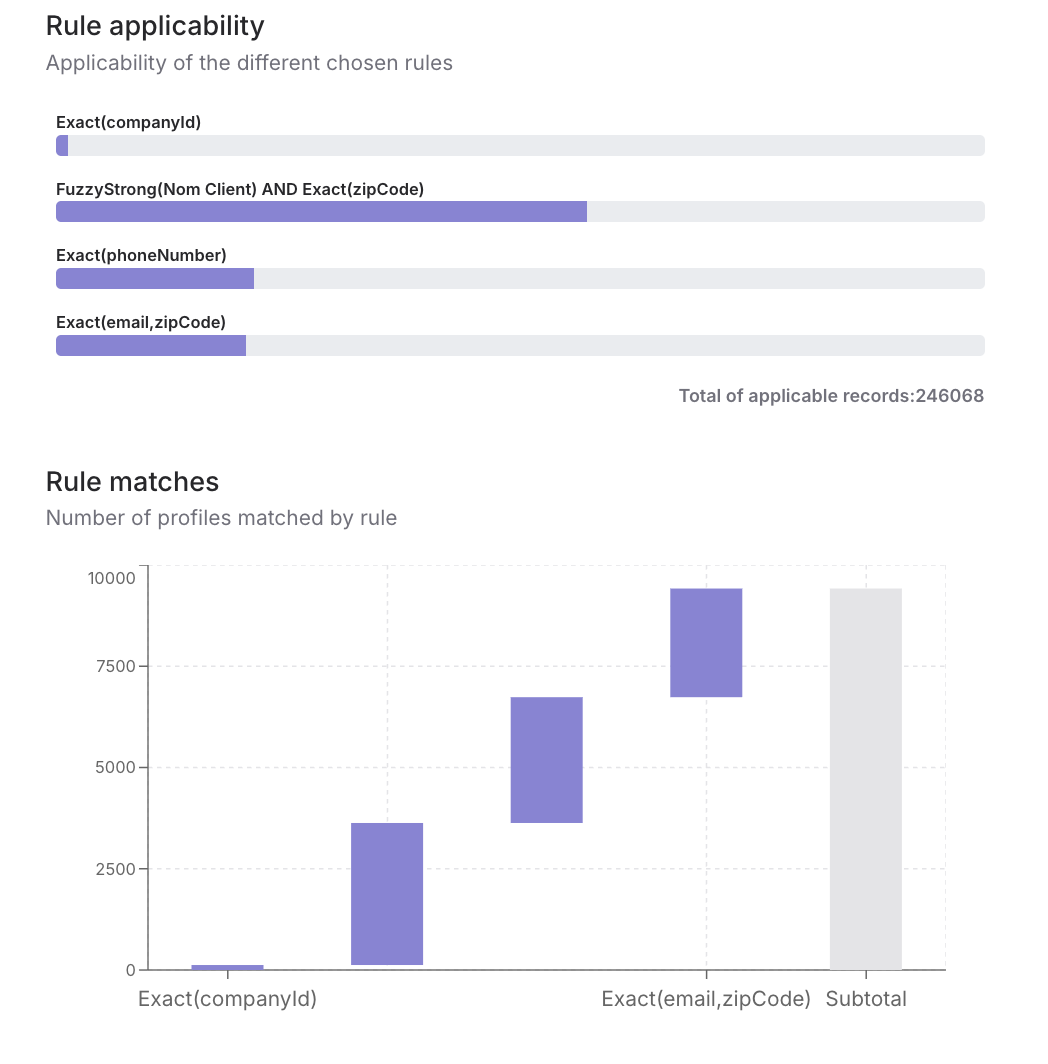
Identity Resolution audit tab showing rule applicability and rule match charts
Audit charts show which rules apply and how many profiles each rule contributes.

Production monitoring checklist

Monitor these indicators over time:

  • latest run status and freshness

  • sudden changes in golden record count

  • sudden changes in unique, matched, missing, or conflict rates

  • rule-level conflict spikes

  • identifier completeness drops

  • suspiciously large clusters

  • unresolved records by reason

  • Event Stitching coverage if event behavior is resolved into event profiles

If a metric changes unexpectedly, compare the latest run with the previous run, inspect the affected model or rule breakdown, and query the audit tables before changing activation logic.

ID continuity

dinmo_id is designed to remain stable across normal runs. In most cases, existing resolved profiles keep the same dinmo_id as new source records are added or updated.

A dinmo_id may change only in specific situations where the resolved identity graph itself changes, for example when two previously separate profiles are merged after new matching evidence appears, or when matching rules or source data are materially changed.

Downstream systems should treat dinmo_id as the current resolved profile key and use the output and audit tables to monitor merges, unresolved records, and other identity changes across runs.

Last updated