> For the complete documentation index, see [llms.txt](https://docs.dinmo.io/llms.txt). Markdown versions of documentation pages are available by appending `.md` to page URLs; this page is available as [Markdown](https://docs.dinmo.io/integrations/destination-platforms/dotdigital.md).
# Dotdigital
DinMo's Dotdigital integration enables marketing teams to effortlessly achieve their business objectives using data from their data warehouse.
DinMo supports the following destination services:
* [Synchronize contacts](/integrations/destination-platforms/dotdigital/synchronize-contacts.md): Update existing Dotdigital contacts with the latest field values and optionally insert new contacts.
* [Synchronize Insight Data Collections](/integrations/destination-platforms/dotdigital/synchronize-insight-data-collections.md): Insert and update records in a Dotdigital Insight Data collection using data from your warehouse.
* [Export Contact Lists](/integrations/destination-platforms/dotdigital/export-contact-lists.md): Create and maintain Dotdigital contact lists based on audience membership in DinMo.
* [Customer program enrolment](/integrations/destination-platforms/dotdigital/customer-program-enrolment.md): Enroll contacts into an existing Dotdigital program when they enter a DinMo audience.
Each destination service covers a specific use case, from keeping contact data up to date to enrolling customers into Dotdigital programs. Please refer to the dedicated documentation page for more information.
## Authentification to Dotdigital
Regardless of the selected destination service, DinMo will always connect to Dotdigital using an API key.
### 🔐 Steps to Create an API User in Dotdigital
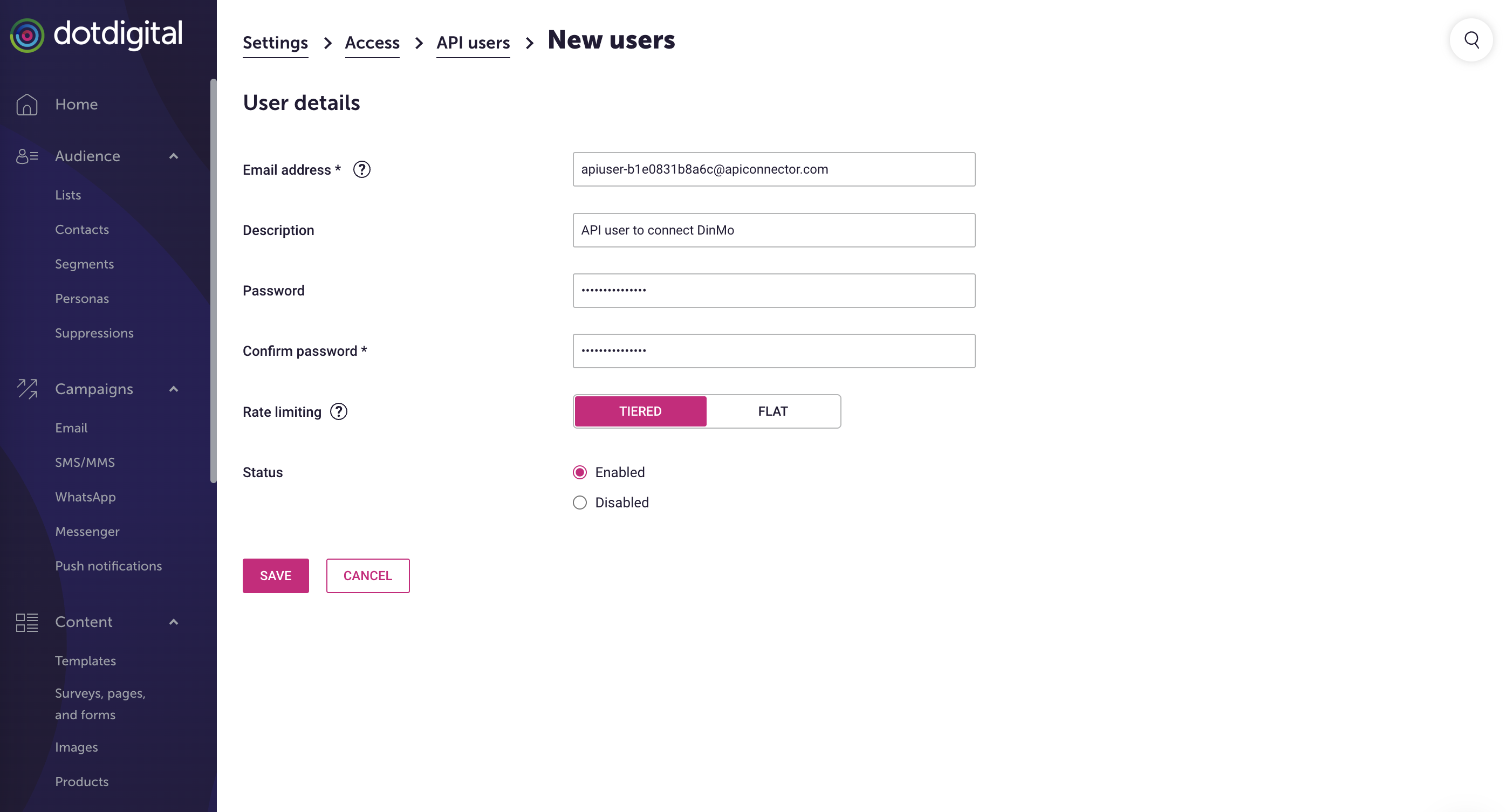
1. **Log in to Dotdigital**: Access your Dotdigital account with your regular credentials.
2. **Navigate to Settings**: In the bottom-left corner, expand the **User menu** and select **Settings**.
3. **Access API Users**: Go to **Access** > **API users**.
4. **Create a New API User**:
* Click on **New User**.
* A username (email address) will be automatically generated for you and cannot be edited.
* Optionally, add a description to identify the purpose of this API user.
* Enter and confirm a password. The password must be at least eight characters long and include at least one digit or non-alphanumeric character.
* For rate limiting, select **Tiered**.
* Set the status to **Enabled**.
* Click **Save** to create the API user.
How to: Create an API User in Dotdigital
---
# Agent Instructions
This documentation is published with GitBook. GitBook is the documentation platform designed so that both humans and AI agents can read, navigate, and reason over technical content effectively. Learn more at gitbook.com.
## Querying This Documentation
If you need additional information that is not directly available in this page, you can query the documentation by asking a question.
Perform an HTTP GET request on the following URL with the `ask` and `goal` query parameters:
```
GET https://docs.dinmo.io/integrations/destination-platforms/dotdigital.md?ask=&goal=
```
`ask` is the immediate question: it should be specific, self-contained, and written in natural language.
`goal` is what the user is ultimately trying to achieve, the reason they need the answer. Sharing it helps GitBook give you a better, more relevant answer. A goal is most helpful when it describes the outcome the user wants rather than restating the question. For example, with `ask=how do I create an API token`, a goal like `automate deployments from our CI pipeline` lets GitBook tailor the answer to that use case.
The response will contain a direct answer to the question and relevant excerpts and sources from the documentation.
Use this mechanism when the answer is not explicitly present in the current page, you need clarification or additional context, or you want to retrieve related documentation sections.