> For the complete documentation index, see [llms.txt](https://docs.dinmo.io/llms.txt). Markdown versions of documentation pages are available by appending `.md` to page URLs; this page is available as [Markdown](https://docs.dinmo.io/integrations/destination-platforms/dotdigital/customer-program-enrolment.md).
# Customer program enrolment
Enroll DinMo Profiles programmatically to your Dotdigital programs
## Overview
In this destination service, DinMo will enroll customers to the selected program in Dotdigital.
Use this destination service when you want DinMo to enroll contacts into a program that is already built in Dotdigital. This is the right option when membership in a DinMo audience should trigger entry into a Dotdigital journey.
To do so, you will need to go through these three steps:
* Creating a Dotdigital destination. Refer to the corresponding section for more info.
* Creating a user model or segment composed of all the users that should be enrolled into the program.
* Activating the model or segment to the Dotdigital destination to start sending data.
Each time the activation runs:
* Any new user entering your DinMo audience will be enrolled into the selected Dotdigital program.
* Users who were already enrolled by a previous run will not be enrolled again unless your Dotdigital program allows re-enrolment.
* DinMo will not remove contacts from the program if they later leave the audience.
{% hint style="info" %}
**Note:**
* The target program must already exist in Dotdigital.
* Contacts must already exist in Dotdigital before enrolment occurs.
* It is therefore recommended to keep all eligible contacts synced to Dotdigital through a **Synchronize contacts** activation before using this destination service.
{% endhint %}
## Destination setup
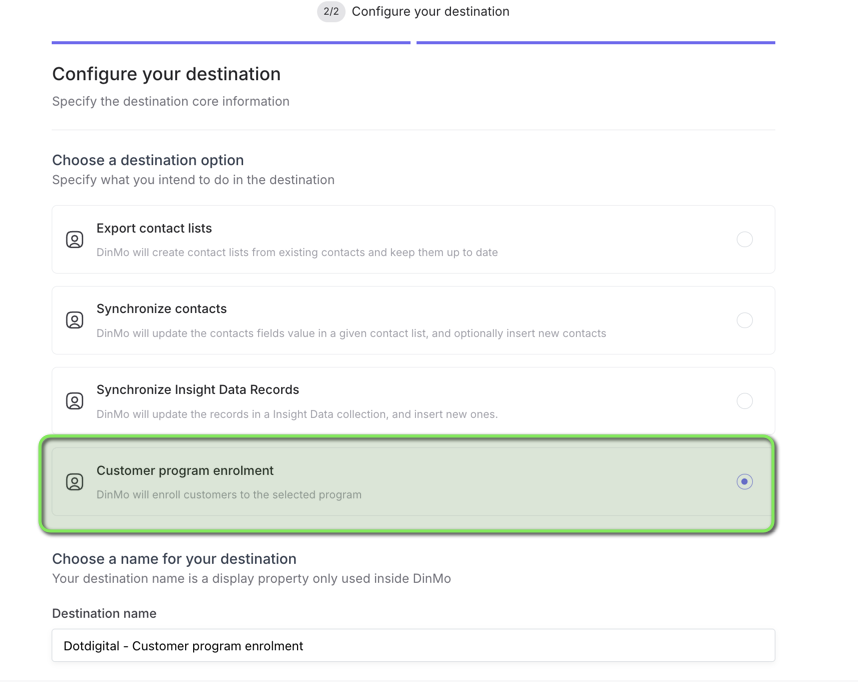
To start enrolling customers into a Dotdigital program, you are first required to create a Dotdigital destination with the corresponding destination service.
* Go To Destinations
* Click on "New Destination"
* Choose your Dot Digital Platform
* On the next page choose the Destination Option: **Customer Program Enrolment**
* Give it a name
* Save
Your destination is now ready and you can start firing actions.
### Optional: Setup default activation settings
At the end of the destination creation, you will be proposed to set up Default Activation Settings. This step is optional, but highly recommended to facilitate the activation process.
By configuring default settings, enrolling new audiences into the same Dotdigital program will take just one click. Without default settings, you will be required to go through the configuration each time you activate a new audience.
Note that even if you set up default settings, you will still be able to adjust activation settings for each audience if you wish.
Refer to the Activation configuration section for more information about the default settings configuration process.
## Activation configuration
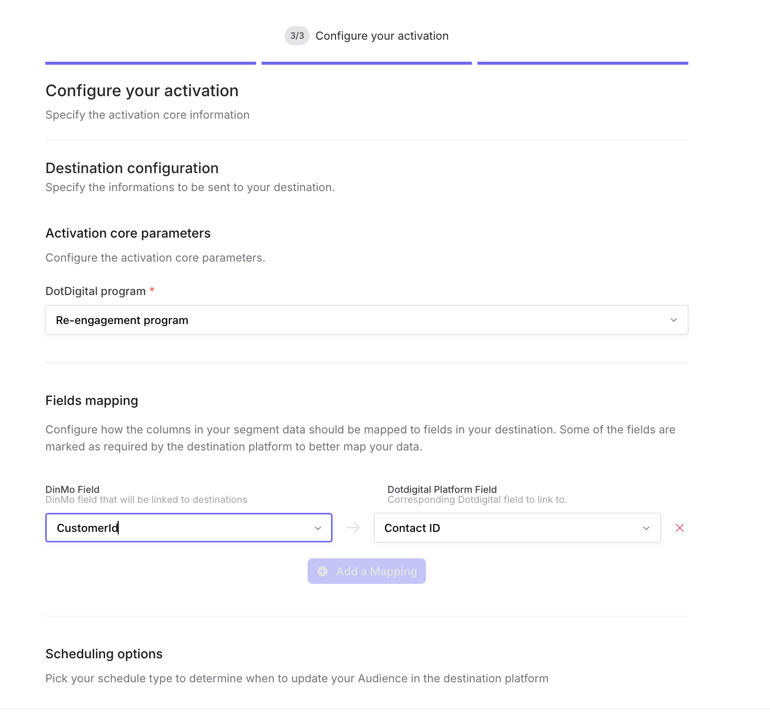
Once the destination has been set up, and your DinMo model or segment created, you can configure an activation to start sending data to Dotdigital right away.
### Program selection
When setting up an activation, you need to specify the Dotdigital program that contacts should be enrolled into.
The selected program must already exist in Dotdigital and be configured to accept API-based enrolments.
Make sure your audience only contains contacts that should enter this specific program.
## Fields mapping
In the **Fields mapping** section, you are asked to specify the field that corresponds to one identifier for each of the users in your audience. This is the field that Dotdigital will use to recognize the contacts sent by DinMo from your data warehouse.
Supported identifiers are:
* Contact ID (internal Dotdigital ID created upon creation of a contact in Dotdigital)
* Email address
* Phone number
At least one identifier must be mapped.
Note:
* Contacts must already exist in Dotdigital before they can be enrolled into a program.
* It is recommended to use a consistent identifier across all Dotdigital activations.
* If Contact ID exists in your data warehouse, this should be the identifier you choose.
### Activation behavior
This destination service behaves like an event-style enrollment flow.
DinMo will only enroll the newest contacts entering the audience each time the activation runs. Previously enrolled contacts are not updated by this destination service, and leaving the audience does not remove a contact from the Dotdigital program.
## Important notes
### Contacts must already exist in Dotdigital
This destination service only enrolls contacts into an existing Dotdigital program. It does not create the contacts themselves.
If a contact does not already exist in Dotdigital, the enrolment will fail. For this reason, we recommend synchronizing contacts to Dotdigital first.
### Enrolment is asynchronous
Dotdigital processes program enrolments asynchronously. As a result, contacts may not appear in the program instantly after DinMo sends them.
### Program start behavior
When contacts are enrolled into a program through the Dotdigital API, they start the journey immediately rather than waiting for the program’s next scheduled execution.
### Re-enrolment behavior
Whether a contact can enter the same program again depends on the enrolment limits configured in Dotdigital.
If the program is configured to allow contacts to enter only once, DinMo will not be able to re-enroll previously exited contacts into that same program. If the program allows re-enrolment after exit or after a delay, DinMo can enroll them again when they re-enter the audience.
### This destination service does not remove contacts from programs
Customer program enrolment is a one-way action from DinMo to Dotdigital.
If a contact leaves your DinMo audience after being enrolled, DinMo will not remove them from the Dotdigital program. Program exits and removals must be handled inside Dotdigital itself.
## Recommended use cases
Use **Customer program enrolment** when you want DinMo to control who should enter a Dotdigital program based on warehouse data.
Typical examples include:
* enroll contacts into a welcome or onboarding program
* enroll customers into a retention or win-back program
* enroll users into a post-purchase or post-signup journey
* enroll contacts into a reminder or lifecycle program based on audience entry
## When not to use this destination service
Do not use this destination service if your goal is to:
* create or update contacts in Dotdigital
* sync attributes to Dotdigital contacts
* create and manage contact lists in Dotdigital
For those use cases, use the corresponding Dotdigital destination services instead.
---
# Agent Instructions
This documentation is published with GitBook. GitBook is the documentation platform designed so that both humans and AI agents can read, navigate, and reason over technical content effectively. Learn more at gitbook.com.
## Querying This Documentation
If you need additional information that is not directly available in this page, you can query the documentation by asking a question.
Perform an HTTP GET request on the following URL with the `ask` and `goal` query parameters:
```
GET https://docs.dinmo.io/integrations/destination-platforms/dotdigital/customer-program-enrolment.md?ask=&goal=
```
`ask` is the immediate question: it should be specific, self-contained, and written in natural language.
`goal` is what the user is ultimately trying to achieve, the reason they need the answer. Sharing it helps GitBook give you a better, more relevant answer. A goal is most helpful when it describes the outcome the user wants rather than restating the question. For example, with `ask=how do I create an API token`, a goal like `automate deployments from our CI pipeline` lets GitBook tailor the answer to that use case.
The response will contain a direct answer to the question and relevant excerpts and sources from the documentation.
Use this mechanism when the answer is not explicitly present in the current page, you need clarification or additional context, or you want to retrieve related documentation sections.