> For the complete documentation index, see [llms.txt](https://docs.dinmo.io/llms.txt). Markdown versions of documentation pages are available by appending `.md` to page URLs; this page is available as [Markdown](https://docs.dinmo.io/journeys/entry-rules.md).

# Configure entry, re-entry, and exit rules

Entry rules determine who can enter a Journey. Re-entry settings control whether a profile can enter again. Exit rules remove profiles that should no longer continue.

## Configure entry rules

Entry rules are configured on the **Start** step. At least one valid entry rule is required before publishing.

### Choose an entry source

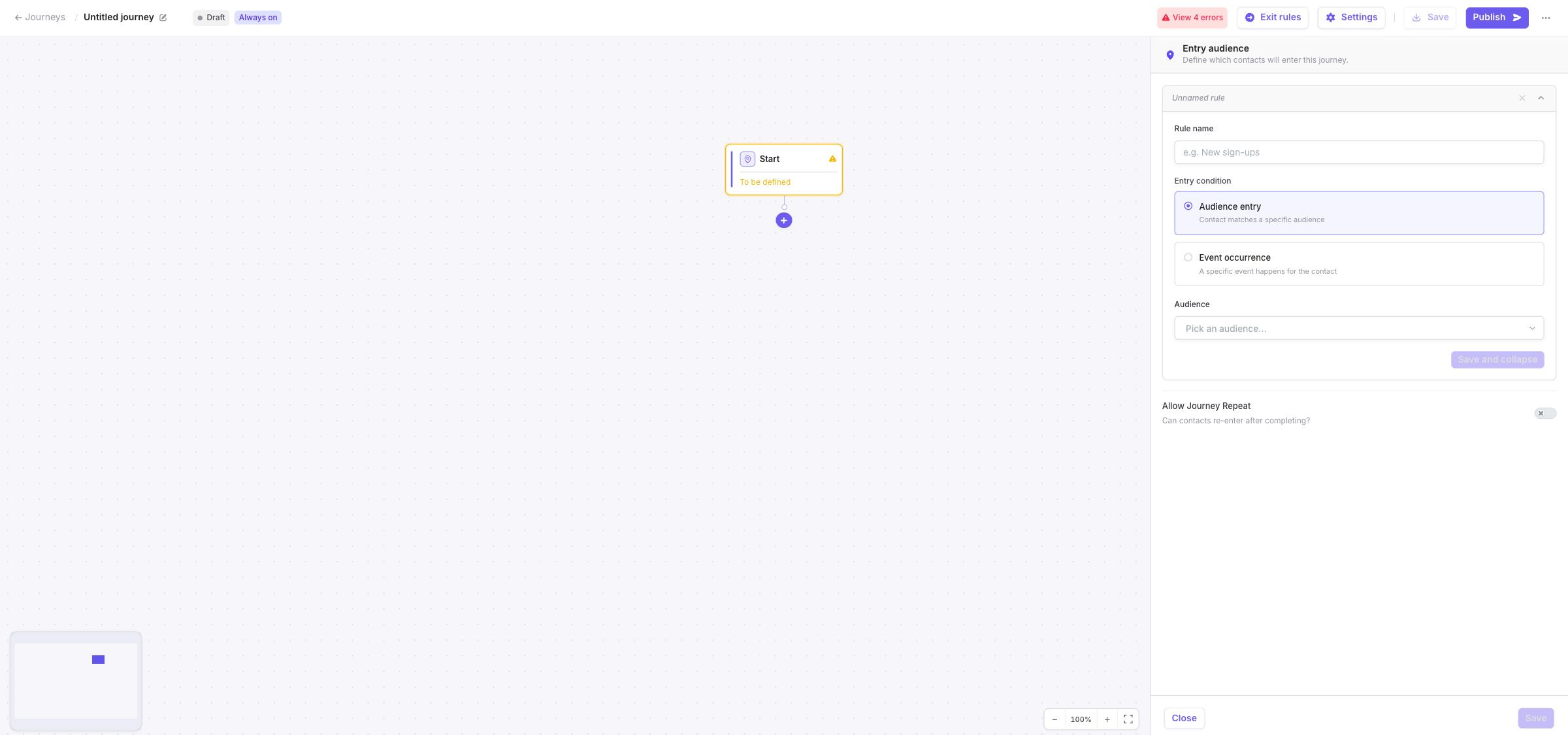
You can add two types of entry rules:

| Entry source         | Use it when                                                    |
| -------------------- | -------------------------------------------------------------- |
| **Audience entry**   | Profiles should enter because they belong to a DinMo audience. |
| **Event occurrence** | Profiles should enter after a tracked event occurs.            |

For an event occurrence, select:

* the event model;
* the minimum number of occurrences;
* optional conditions on the event properties.

For example, you can enroll profiles after a signup event or after several purchase events matching a specific condition.

<figure><img src="https://3204318043-files.gitbook.io/~/files/v0/b/gitbook-x-prod.appspot.com/o/spaces%2FxzBTp1t4OfqV67nXkVse%2Fuploads%2Fgit-blob-e848d65475022698adcbaf651e0b943ab47240cb%2Fjourney-rules-entry-sources.jpg?alt=media" alt="Start configuration panel showing Audience entry and Event occurrence options"><figcaption><p>Choose whether profiles enter through audience membership or a tracked event.</p></figcaption></figure>

## Combine several entry rules

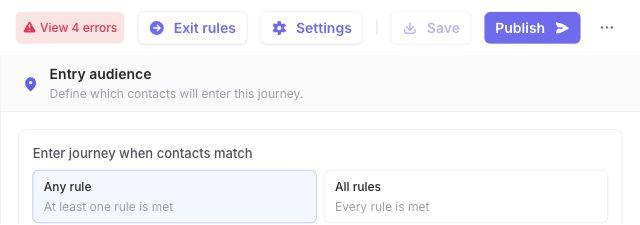
When the Start step contains several entry rules, choose how they are combined:

* **Any rule**: a profile is eligible when at least one rule matches.
* **All rules**: a profile is eligible only when every rule matches.

Use **All rules** when the conditions describe a single, combined population. Use **Any rule** when each rule independently makes a profile eligible.

<figure><img src="https://3204318043-files.gitbook.io/~/files/v0/b/gitbook-x-prod.appspot.com/o/spaces%2FxzBTp1t4OfqV67nXkVse%2Fuploads%2Fgit-blob-87e157478794412141201aca7e39016584a8cb7c%2Fjourney-rules-entry-operator.jpg?alt=media" alt="Entry rule operator showing Any rule and All rules options"><figcaption><p>Choose how DinMo combines multiple entry rules.</p></figcaption></figure>

Entry rules are evaluated according to the Journey's processing schedule and enrollment mode. Matching a rule does not necessarily mean that the profile enters immediately.

## Allow profiles to re-enter

By default, a profile can enter a Journey only once.

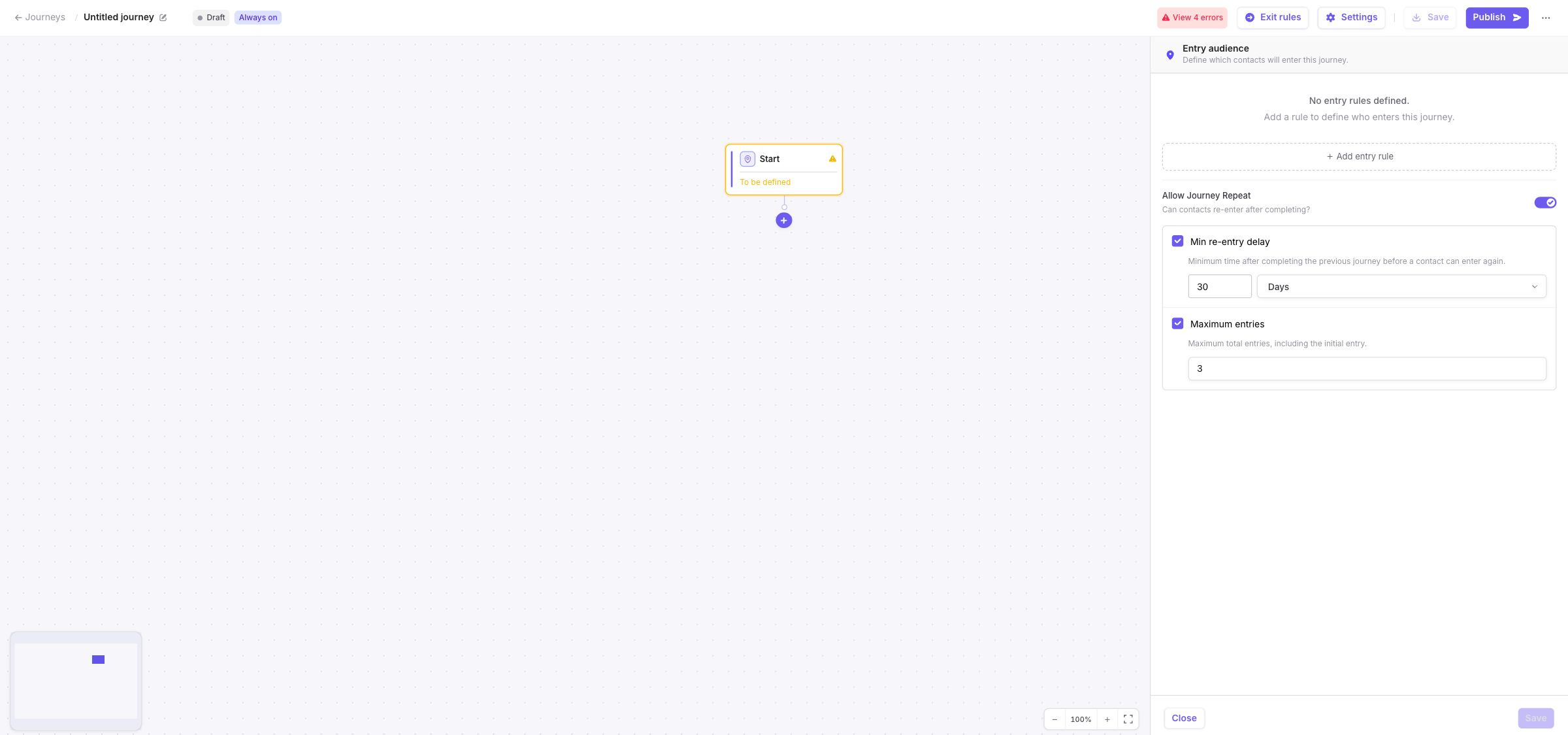
Enable **Allow Journey Repeat** when a profile should be able to enter again after its previous occurrence has completed or ended through an exit rule.

A profile cannot have several concurrent occurrences in the same Journey.

### Set a minimum re-entry delay

You can require profiles to wait before becoming eligible again.

The delay is measured from the time the previous Journey occurrence ended. It can be expressed in:

* days;
* weeks;
* months.

For re-entry delays, one month represents 30 days.

For example, you can require profiles to wait 30 days before they become eligible to enter again.

### Set a maximum number of entries

You can limit how many times a profile may enter the Journey.

The maximum includes:

* the initial entry;
* entries that reached a Stop step;
* entries that ended through an exit rule.

For example, setting the maximum to `3` allows one initial entry and up to two re-entries.

You can configure a delay, a maximum number of entries, or both.

<figure><img src="https://3204318043-files.gitbook.io/~/files/v0/b/gitbook-x-prod.appspot.com/o/spaces%2FxzBTp1t4OfqV67nXkVse%2Fuploads%2Fgit-blob-ed0a435d6dc30fab81b4ea67d851ddc354e220e4%2Fjourney-rules-reentry-settings.jpg?alt=media" alt="Start configuration panel showing a 30-day minimum re-entry delay and a maximum of three entries"><figcaption><p>Control how soon and how often a profile can enter again.</p></figcaption></figure>

{% hint style="warning" %}
If Journey Repeat is enabled without a delay or an entry limit, an eligible profile may re-enter on a subsequent evaluation as soon as its previous occurrence has ended.
{% endhint %}

## Configure exit rules

Exit rules remove profiles that should no longer continue through the Journey.

They are configured from **Exit rules** in the builder toolbar and apply to the entire Journey, regardless of the profile's current step or branch.

Exit rules are optional.

### Choose an exit source

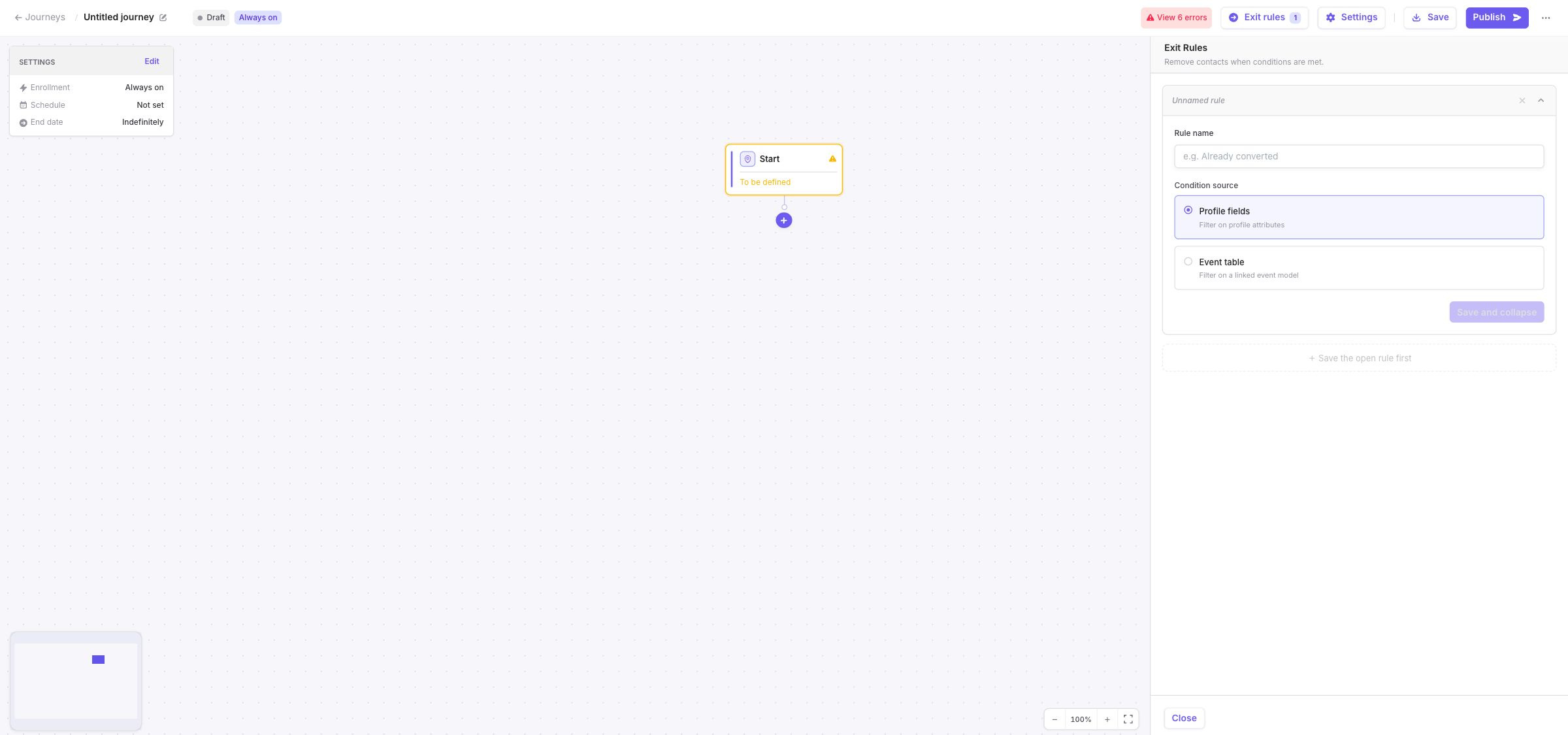
You can create exit rules from:

| Exit source        | Use it when                                                              |
| ------------------ | ------------------------------------------------------------------------ |
| **Profile fields** | A current profile attribute determines whether the profile should leave. |
| **Event table**    | A tracked event should stop the profile's progression.                   |

For example, you can remove a profile when its status becomes `converted`, or when a purchase or cancellation event occurs.

Each exit rule must have a name that describes the condition it represents.

<figure><img src="https://3204318043-files.gitbook.io/~/files/v0/b/gitbook-x-prod.appspot.com/o/spaces%2FxzBTp1t4OfqV67nXkVse%2Fuploads%2Fgit-blob-0461562480466b0adccc917fc8c697b0e6df4d6d%2Fjourney-rules-exit-sources.jpg?alt=media" alt="Exit Rules panel showing Profile fields and Event table condition sources"><figcaption><p>Exit rules can use current profile attributes or tracked events.</p></figcaption></figure>

### Understand when exit rules are evaluated

Exit rules are evaluated during each Journey processing run, before profiles move to their next step.

When a profile matches the exit configuration:

* its current Journey occurrence ends;
* it no longer progresses through the remaining steps;
* it may become eligible for re-entry later if Journey Repeat is enabled.

Exit rules therefore follow the Journey's processing schedule. They are not evaluated continuously between two runs.

### Event-based exit rules

For an event-based exit rule, configure:

* the event model;
* the minimum number of occurrences;
* optional conditions on the event properties.

Only events occurring after the profile entered its current Journey occurrence are considered. Events that happened before or exactly when the profile entered are ignored.

This prevents an old event from immediately removing a profile from a newly started Journey occurrence.

## Combine several exit rules

When several exit rules are configured, choose how they are combined:

* **Any rule**: the profile exits when at least one rule matches.
* **All rules**: the profile exits only when every rule matches.

Use **Any rule** when each condition independently means that the Journey should stop.

For example, you can remove a profile when a conversion event occurs or when its subscription status becomes inactive.

Use **All rules** only when the exit decision genuinely depends on a combination of conditions.

## Limits and editing rules

A Journey can contain:

* up to 10 entry rules;
* up to 10 exit rules.

Re-entry delays and maximum entry counts must be positive whole numbers.

Entry rules, re-entry settings, and exit rules are read-only while the Journey is active. Pause the Journey before changing them, then publish the updated configuration.

## Recommendations

* Start with the smallest set of entry rules that describes the intended population.
* Add a re-entry delay or entry limit when repeated activation should be controlled.
* Use exit rules when a conversion or customer-state change should stop all remaining actions.
* Remember that event-based exit rules only consider events occurring after the current Journey entry.
* Check entry and exit volumes after publication to confirm that the rules behave as expected.

## Related pages

* [Create your first Journey](/journeys/create-your-first-journey.md)
* [Configure Journey steps and branches](/journeys/steps-and-branches.md)
* [Publish and manage a Journey](/journeys/publish-pause-and-resume-a-journey.md)
* [Monitor and troubleshoot](/journeys/monitoring-and-troubleshooting.md)


---

# Agent Instructions
This documentation is published with GitBook. GitBook is the documentation platform designed so that both humans and AI agents can read, navigate, and reason over technical content effectively. Learn more at gitbook.com.

## Querying This Documentation
If you need additional information that is not directly available in this page, you can query the documentation dynamically by asking a question.

Perform an HTTP GET request on the current page URL with the `ask` query parameter, and the optional `goal` query parameter:

```
GET https://docs.dinmo.io/journeys/entry-rules.md?ask=<question>&goal=<endgoal>
```

`ask` is the immediate question: it should be specific, self-contained, and written in natural language.
`goal` is optional and describes the broader end goal you are ultimately trying to accomplish on behalf of the user. GitBook uses it to tailor the answer towards what is most useful for that goal.

The response will contain a direct answer to the question and relevant excerpts and sources from the documentation.

Use this mechanism when the answer is not explicitly present in the current page, you need clarification or additional context, or you want to retrieve related documentation sections.