> For the complete documentation index, see [llms.txt](https://docs.dinmo.io/llms.txt). Markdown versions of documentation pages are available by appending `.md` to page URLs; this page is available as [Markdown](https://docs.dinmo.io/models/computed-fields/aggregated-fields.md).
# Aggregated Fields
Calculate a value from multiple records in a related model.
Aggregated fields calculate a single value from multiple records in a related model.
Use them when a record in your parent model is linked to several records in another model. For example, a customer can be linked to many transactions, so you can calculate total revenue, number of purchases, or average basket value.
## Create an aggregated field
1. Choose the parent model where the field will be created.
2. Select the related model that contains the records to aggregate.
3. Select an aggregation method.
4. Choose the field to aggregate when the method requires one.
5. Optionally add filters to include only relevant records.
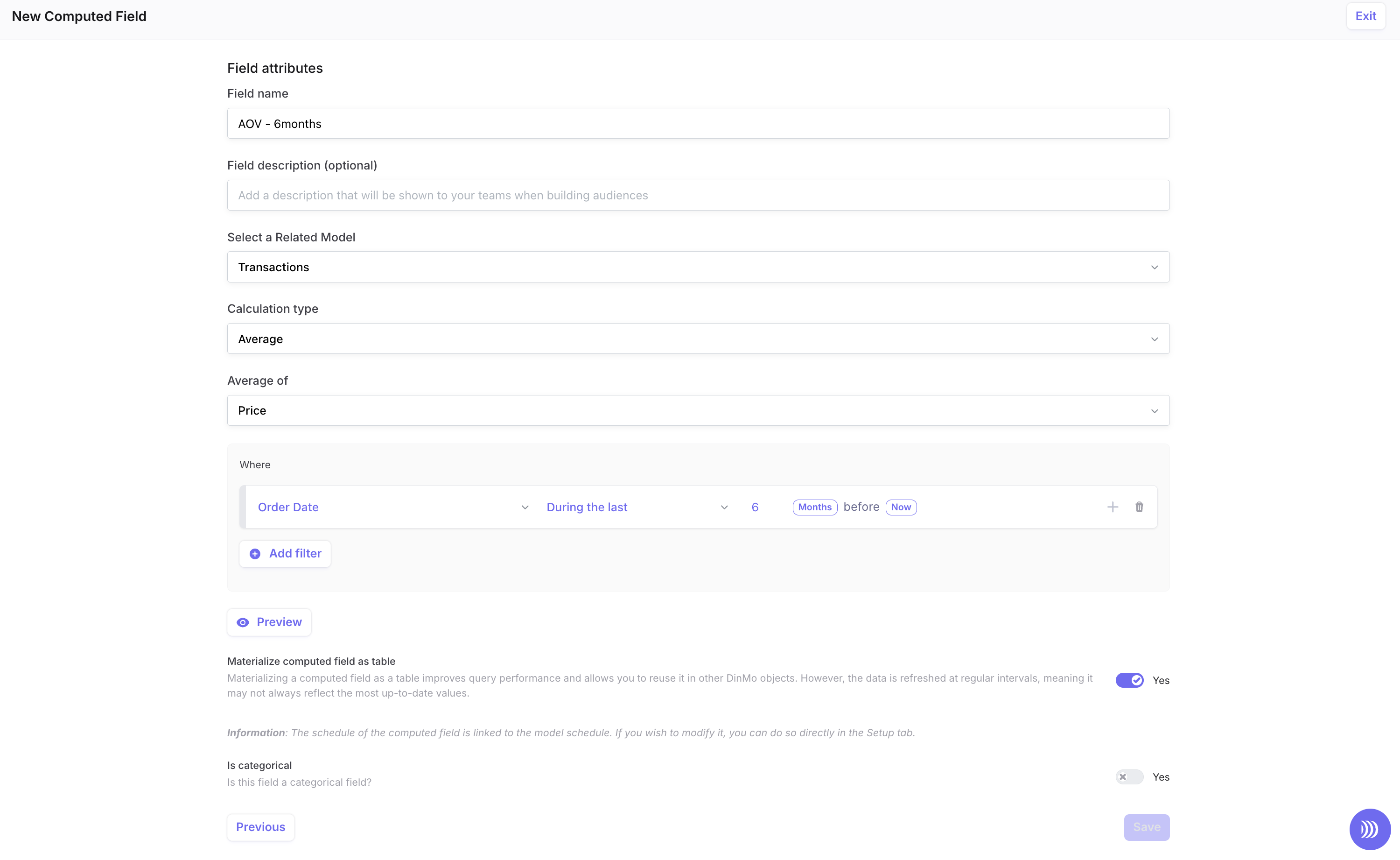
Select the related model, aggregation method, field, and optional filters.
## Available aggregation methods
| Method | Description | Example |
| ---------------- | -------------------------------------- | ------------------------------------------------ |
| Count | Counts related records. | Number of purchases per customer. |
| Distinct count | Counts unique values. | Number of distinct product categories purchased. |
| Sum | Adds numeric values. | Total revenue per customer. |
| Average | Calculates the mean of numeric values. | Average basket value. |
| Minimum | Returns the lowest value. | Lowest transaction amount. |
| Maximum | Returns the highest value. | Highest transaction amount. |
| Most frequent | Returns the most common value. | Most purchased product category. |
| List aggregation | Returns a list of values. | List of product IDs purchased by a customer. |
## Filter the records to aggregate
Use filters to limit the records included in the calculation.
For example, you can calculate:
* Revenue from completed transactions only.
* Number of purchases in the last 30 days.
* Average basket value for a specific product category.
Filters are applied before the aggregation is calculated.
## Example: customer lifetime value
To create a `lifetime_value` field on a Customers model:
1. Select **Customers** as the parent model.
2. Select **Transactions** as the related model.
3. Choose **Sum**.
4. Select the transaction amount field.
5. Filter transactions to include completed purchases only.
The resulting field can then be used in segments and activation mappings.
---
# Agent Instructions
This documentation is published with GitBook. GitBook is the documentation platform designed so that both humans and AI agents can read, navigate, and reason over technical content effectively. Learn more at gitbook.com.
## Querying This Documentation
If you need additional information that is not directly available in this page, you can query the documentation dynamically by asking a question.
Perform an HTTP GET request on the current page URL with the `ask` query parameter, and the optional `goal` query parameter:
```
GET https://docs.dinmo.io/models/computed-fields/aggregated-fields.md?ask=&goal=
```
`ask` is the immediate question: it should be specific, self-contained, and written in natural language.
`goal` is optional and describes the broader end goal you are ultimately trying to accomplish on behalf of the user. GitBook uses it to tailor the answer towards what is most useful for that goal.
The response will contain a direct answer to the question and relevant excerpts and sources from the documentation.
Use this mechanism when the answer is not explicitly present in the current page, you need clarification or additional context, or you want to retrieve related documentation sections.