> For the complete documentation index, see [llms.txt](https://docs.dinmo.io/llms.txt). Markdown versions of documentation pages are available by appending `.md` to page URLs; this page is available as [Markdown](https://docs.dinmo.io/models/computed-fields/label-fields.md).
# Label Fields
Classify records into business-friendly categories using conditions.
Label fields assign a business-friendly value to each record according to conditions that you define.
They are useful when you want to turn raw values into consistent business categories. For example, you can create labels such as `High value`, `At risk`, `New customer`, or `Inactive`.
## Use other computed fields
Label conditions can use existing formula fields and label fields from the same model. This lets you build layered classifications, such as a label based on an eligibility formula.
To prevent circular references, DinMo excludes the current field and any field that depends on it from the field picker.
## Create a label field
1. Choose the parent model where the field will be created.
2. Select the output type.
3. Under **WHEN**, add one or more conditions that must be evaluated for the first assignment.
4. Define the value to assign when those conditions are met.
5. Add as many additional **WHEN** cases as needed, each with its own conditions and assigned value.
6. Define the default value for records that do not match any case.
## Define cases
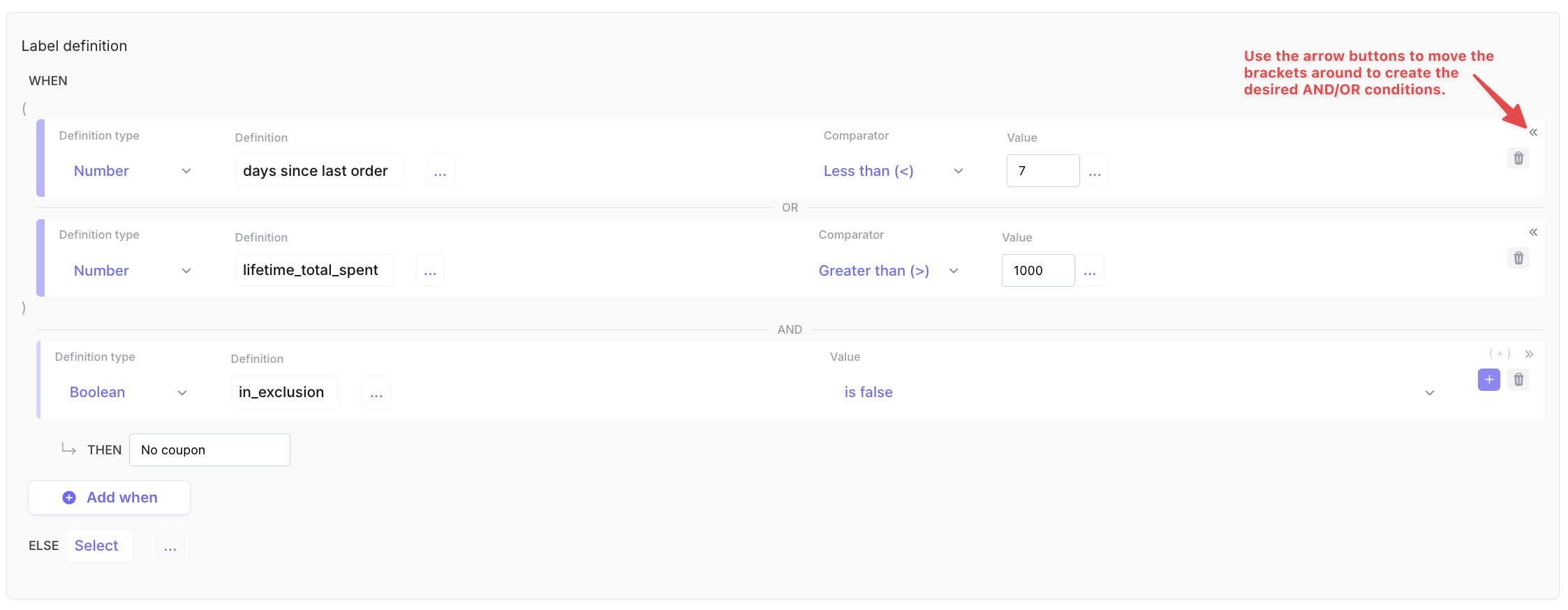
A label field evaluates **WHEN** cases in order. Within each case, you can add as many conditions as needed before assigning a value with **THEN**.
Combine conditions with `AND` and `OR`. Use the arrow buttons to move the brackets and group conditions when you need to control how `AND` and `OR` are evaluated.
Add and group conditions in a WHEN case, then define the value assigned with THEN.
## Example: customer engagement
Create a `customer_engagement` label field with these cases:
| Condition | Assigned value |
| ----------------------------------------------------------------- | ---------------- |
| Last purchase was within 30 days and purchase count is at least 3 | `Highly engaged` |
| Last purchase was within 90 days | `Engaged` |
| Last purchase was more than 90 days ago | `At risk` |
| Any other record | `Unknown` |
This field provides a consistent business classification for segments and activations.
## Good practices
* Order cases from the most specific to the broadest.
* Always define a default value.
* Use labels that downstream teams can understand.
* Preview the field to check how records are distributed across labels.
---
# Agent Instructions
This documentation is published with GitBook. GitBook is the documentation platform designed so that both humans and AI agents can read, navigate, and reason over technical content effectively. Learn more at gitbook.com.
## Querying This Documentation
If you need additional information that is not directly available in this page, you can query the documentation dynamically by asking a question.
Perform an HTTP GET request on the current page URL with the `ask` query parameter, and the optional `goal` query parameter:
```
GET https://docs.dinmo.io/models/computed-fields/label-fields.md?ask=&goal=
```
`ask` is the immediate question: it should be specific, self-contained, and written in natural language.
`goal` is optional and describes the broader end goal you are ultimately trying to accomplish on behalf of the user. GitBook uses it to tailor the answer towards what is most useful for that goal.
The response will contain a direct answer to the question and relevant excerpts and sources from the documentation.
Use this mechanism when the answer is not explicitly present in the current page, you need clarification or additional context, or you want to retrieve related documentation sections.