> For the complete documentation index, see [llms.txt](https://docs.dinmo.io/llms.txt). Markdown versions of documentation pages are available by appending `.md` to page URLs; this page is available as [Markdown](https://docs.dinmo.io/segments/remote-segments.md).
# Remote segments
## Overview
**Remote Segments** allow DinMo to retrieve and reuse segments that have been created in a third-party marketing or activation platform.
Instead of recreating the same logic in multiple tools, Remote Segments enable DinMo to **reference an existing segment**, ingest its members, enrich them with DinMo data, and make the resulting audience available across the entire stack.
{% hint style="info" %}
Remote Segments are particularly useful when a segment is tightly coupled to engagement logic, real-time signals, or channel-specific behaviors that are best managed outside of DinMo.
{% endhint %}
### Recommended use cases for Remote Segments
Use a Remote Segment when:
* The segment is **created and maintained in a third-party tool**.
* Its definition depends on:
* engagement signals (opens, clicks, impressions, responses),
* real-time or near-real-time events,
* campaign, journey, or scenario context.
* The segment is mainly used for **activation or orchestration**, rather than as a long-term business definition.
Typical examples:
* Users who opened or clicked a campaign in the last X days
* Users currently in a specific journey step
* Non-responders to a recent activation
* A/B test cohorts or holdout groups
In these cases, DinMo does not attempt to replicate the logic. Instead, it **imports the segment membership** and enriches it.
{% hint style="warning" %}
Not all third-party platforms are currently supported for Remote Segments.
If your preferred marketing or activation tool is not available yet, you can **request the Remote Segment feature to be unlocked** for that platform by contacting your CSM.
{% endhint %}
## How remote segments work
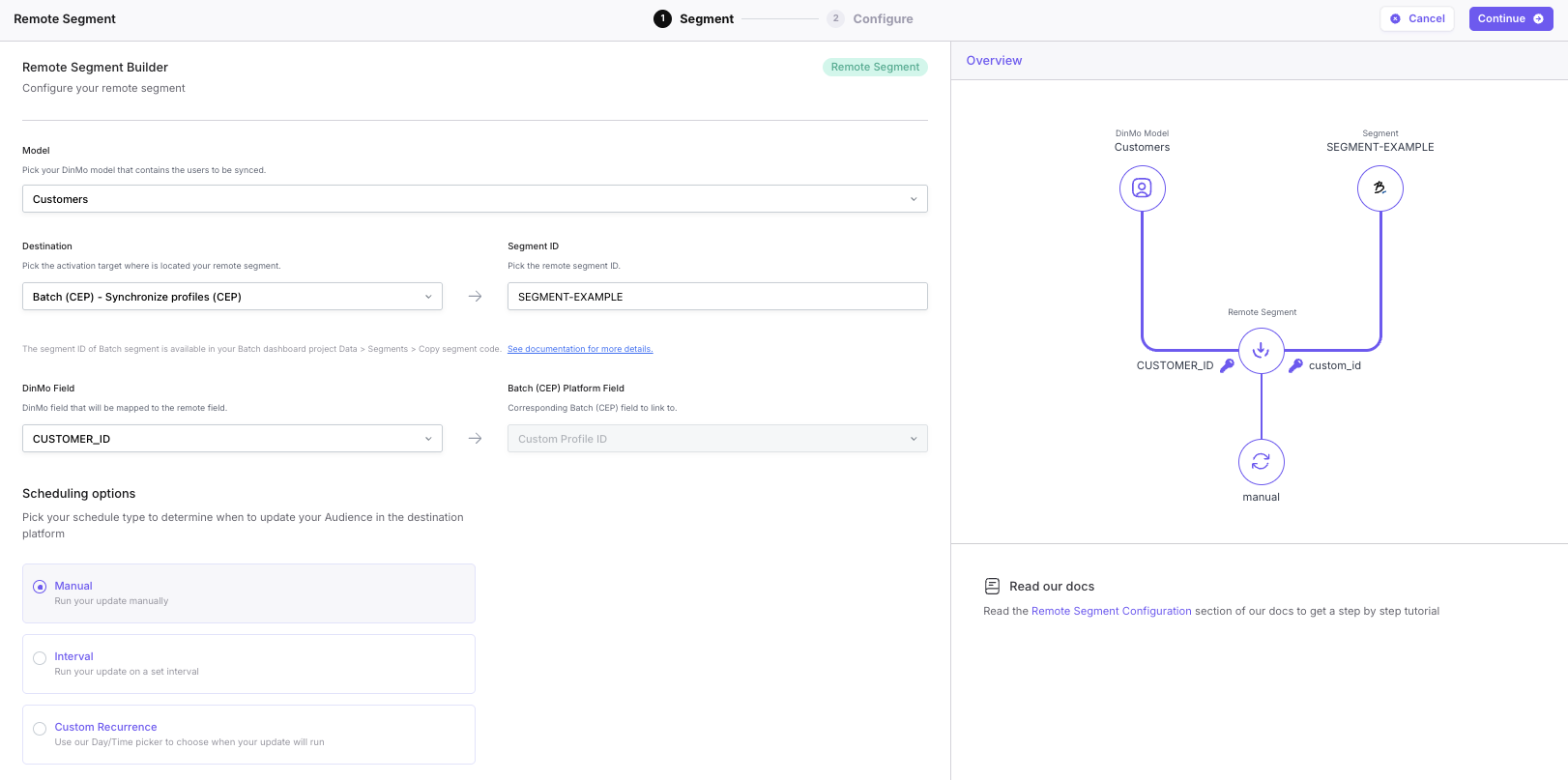
Creating a Remote Segment in DinMo follows a simple, structured flow:
### Step 1: Create a new segment
In DinMo, create a new segment and select **Remote Segment** as the segment type.
### Step 2: Select the data model
Choose the DinMo model that the segment will be built on (for example: `Contacts`, `Users`, `Customers`, etc.).
> ⚠️ Important\
> DinMo only retrieves the **IDs contained in the remote segment from the destination**.\
> It then **enriches those IDs** using the selected model to rebuild a full segment with all available attributes (e.g. first name, last name, email, status, scores, etc.).
### Step 3: Configure the Remote source
Define where the segment comes from:
* Select the **destination platform** (the third-party tool where the segment was created).
* Provide the **remote segment identifier** (segment ID) from that platform.
This identifier is used by DinMo to fetch the list of members.
### Step 4: Map the shared identifier(s)
Map the common identifier(s) between:
* a column in the DinMo model, and
* the identifier used by the third-party platform.
Examples:
* `contact_id`
* `user_id`
* `email`
* `external_id`
{% hint style="info" %}
If the platform has multiple identifiers, we ask that you only map the one that is common between DinMo and the third-party tool.
{% endhint %}
### Step 5: Set the refresh frequency
Define how often DinMo should refresh the Remote Segment.
At each refresh:
1. DinMo retrieves the list of IDs from the third-party platform.
2. The segment is rebuilt using the latest membership.
3. All related attributes from the DinMo model are updated accordingly.
## What happens after synchronization
Once synchronized, DinMo holds a **fully enriched segment**, not just a list of IDs.
This enriched segment can then be:
* analyzed in DinMo,
* combined with other DinMo segments or attributes,
* activated and sent to **any other destination** (ads platforms, CRM tools, personalization engines, analytics, etc.).
In other words:
> **A Remote Segment becomes a first-class segment in DinMo**, even though its original definition lives elsewhere.
## In a nutshell
* Remote Segments allow DinMo to **reuse segments defined in third-party tools**.
* DinMo retrieves **only the segment membership (IDs)** and enriches it using its own data models.
* This approach avoids duplication of logic while ensuring:
* consistency across channels,
* centralized enrichment,
* omnichannel activation.
* Remote Segments are best suited for **engagement-driven or tool-specific audiences**, while DinMo remains the reference for stable, cross-channel segments.
---
# Agent Instructions
This documentation is published with GitBook. GitBook is the documentation platform designed so that both humans and AI agents can read, navigate, and reason over technical content effectively. Learn more at gitbook.com.
## Querying This Documentation
If you need additional information that is not directly available in this page, you can query the documentation by asking a question.
Perform an HTTP GET request on the following URL with the `ask` and `goal` query parameters:
```
GET https://docs.dinmo.io/segments/remote-segments.md?ask=&goal=
```
`ask` is the immediate question: it should be specific, self-contained, and written in natural language.
`goal` is what the user is ultimately trying to achieve, the reason they need the answer. Sharing it helps GitBook give you a better, more relevant answer. A goal is most helpful when it describes the outcome the user wants rather than restating the question. For example, with `ask=how do I create an API token`, a goal like `automate deployments from our CI pipeline` lets GitBook tailor the answer to that use case.
The response will contain a direct answer to the question and relevant excerpts and sources from the documentation.
Use this mechanism when the answer is not explicitly present in the current page, you need clarification or additional context, or you want to retrieve related documentation sections.