> For the complete documentation index, see [llms.txt](https://docs.dinmo.io/llms.txt). Markdown versions of documentation pages are available by appending `.md` to page URLs; this page is available as [Markdown](https://docs.dinmo.io/integrations/destination-platforms/batch/delete-profiles-cep-and-mep.md).
# Delete profiles (CEP & MEP)
## Overview
In this destination, DinMo will delete profiles from your **Batch dashboard**.
{% hint style="danger" %}
**This operation is irreversible**.\
You can always recreate a profile via another Batch destination service, but you will lose the historical data for that profile in Batch.
{% endhint %}
To do so, you will need to go through these three steps:
* Creating a Batch destination. Refer to the [corresponding section](#destination-setup) for more info.
* Creating a user segment (or model) composed of all the users that have to be deleted from Batch.
* Activating the segment to the Batch destination to delete profiles.
Each time the activation will be running, profiles will be deleted from your Batch dashboard.
## Destination setup
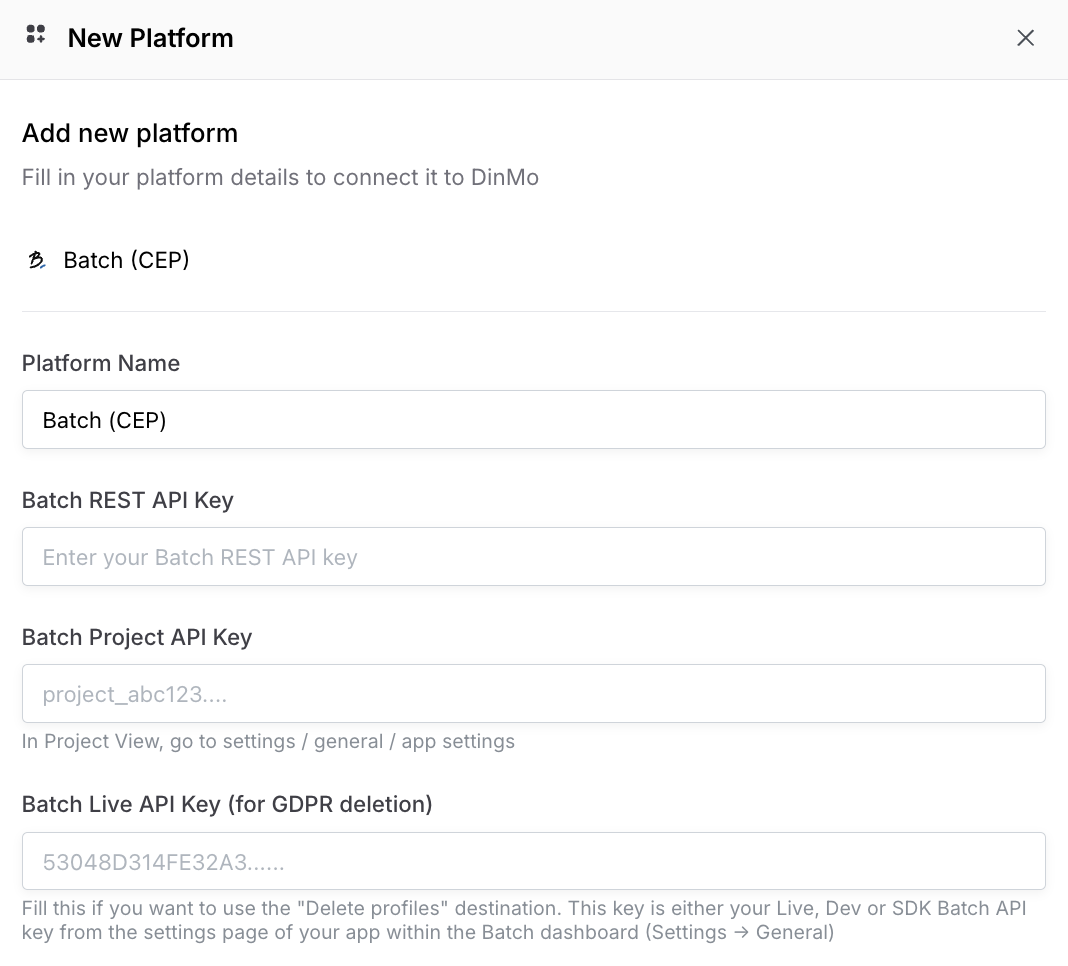
To start deleting profiles, you are first required to create a Batch destination with the corresponding destination service.
To get your API and project key, navigate to settings (in Batch) and copy your **REST API Key** and **Project Key** into DinMo.
You'll also need a **Batch Live API Key**. This key is either your Live, Dev or SDK Batch API key from the settings page of your app within the Batch dashboard.
## Activation setup
Once the destination has been setup, and your DinMo segment created, you can create an activation to start deleting profiles in Batch right away.
First, you must select the segment/model that contains the data to be deleted in Batch, then the correct destination service. A few additional configurations are then necessary:
### Run type
To indicate how the data should be deleted, configure the run type:
* **Full only:** DinMo deletes the entire segment/model at each run.
* **Full then Delta:** DinMo deletes the entire segment/model on the first run. After that, DinMo only deletes new people (compared to the historical runs).
{% hint style="info" %}
For example, if a person has been deleted, then is back in Batch (e.g., because they have made another purchase from your company) and finds themselves back in the deletion segment
* **Full only** will effectively delete this person a second time
* **Full then Delta** will not delete this person because they have already been deleted in the future.
{% endhint %}
### Fields mapping
It is necessary to map the **person's unique identifier** in the Batch dashboard.
### Scheduling options
In this section, specify how often the list should be deleted in Batch. Every time the activation runs:
* **Full only**: Any user in your segment/model will be deleted in Batch
* **Full then Delta**: Any new user entering your DinMo model or segment will be deleted in Batch
---
# Agent Instructions
This documentation is published with GitBook. GitBook is the documentation platform designed so that both humans and AI agents can read, navigate, and reason over technical content effectively. Learn more at gitbook.com.
## Querying This Documentation
If you need additional information that is not directly available in this page, you can query the documentation by asking a question.
Perform an HTTP GET request on the following URL with the `ask` and `goal` query parameters:
```
GET https://docs.dinmo.io/integrations/destination-platforms/batch/delete-profiles-cep-and-mep.md?ask=&goal=
```
`ask` is the immediate question: it should be specific, self-contained, and written in natural language.
`goal` is what the user is ultimately trying to achieve, the reason they need the answer. Sharing it helps GitBook give you a better, more relevant answer. A goal is most helpful when it describes the outcome the user wants rather than restating the question. For example, with `ask=how do I create an API token`, a goal like `automate deployments from our CI pipeline` lets GitBook tailor the answer to that use case.
The response will contain a direct answer to the question and relevant excerpts and sources from the documentation.
Use this mechanism when the answer is not explicitly present in the current page, you need clarification or additional context, or you want to retrieve related documentation sections.